Favicon of Devin

Devin

Devin by Cognition is an autonomous AI software engineer that plans tasks, writes code, runs tests, debugs, and opens pull requests.

Reviewed by Mathijs Bronsdijk · Updated Apr 19, 2026

ToolFree + Paid PlansUpdated 16 days ago
API AvailableFree Tier · From $20/month10+ IntegrationsSOC 2 Type IICloud$400M Raised
World's first fully autonomous AI software engineerAchieved 12x efficiency improvements on migrations78% success rate on bug fixes with clear stepsCan generate documentation across 400,000+ repositoriesIntegrates with GitHub, Slack, Jira, and moreSession startup improved to 15 seconds in 2.2Managed Devins enable parallel task executionFree tier available for basic AI tools
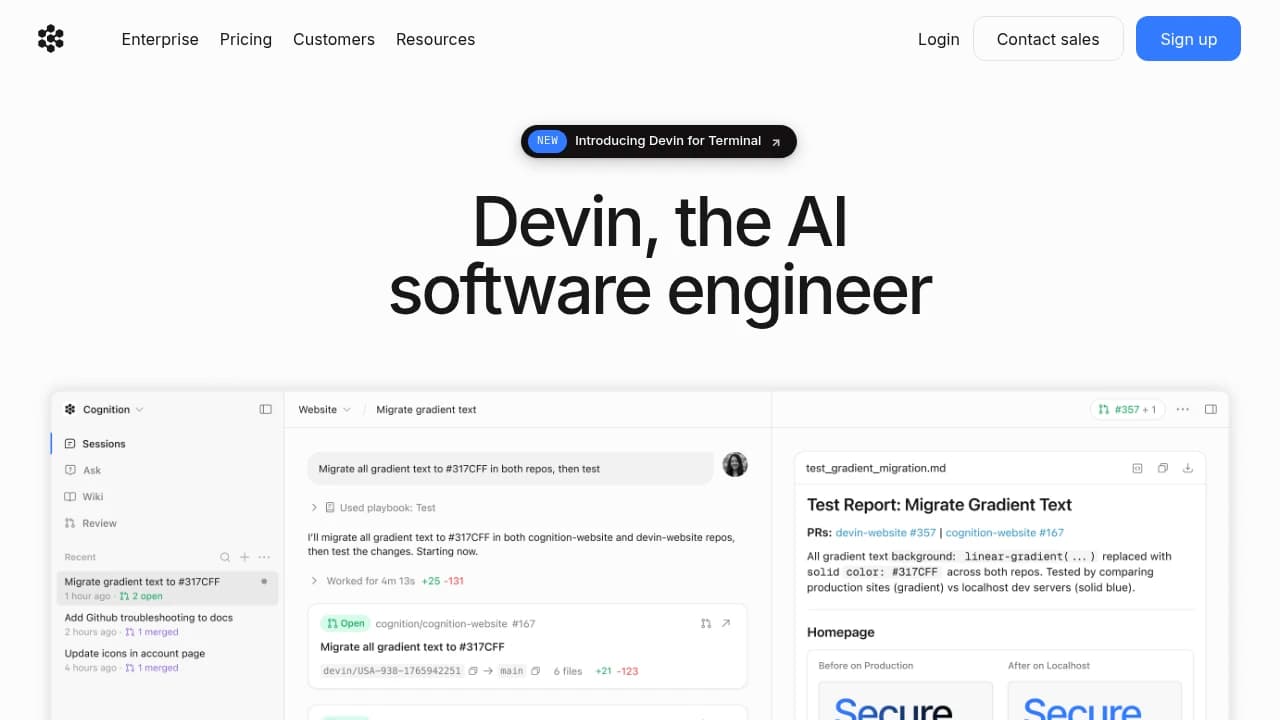
Screenshot of Devin website

What is Devin?

Devin is an autonomous AI software engineer from Cognition, the startup founded by Scott Wu and a team known for competitive programming backgrounds and a heavy focus on reasoning systems. Cognition introduced Devin in 2024 with a bold claim, that software work could move beyond autocomplete and chat assistance into an agent that plans tasks, writes code, runs tests, debugs failures, opens pull requests, and keeps going without constant human steering. Since then, Cognition has raised major funding, reportedly more than $400 million at a $10.2 billion post-money valuation, which helps explain why Devin has attracted so much attention from engineering leaders.

What makes Devin different from tools like Copilot or Cursor is the working style. Instead of sitting inside your editor waiting for prompts, Devin runs in its own cloud sandbox with a terminal, browser, code editor, and integrations into tools like GitHub, Slack, Jira, and Linear. You give it a task, it proposes a plan, then it executes that plan across the codebase, testing and revising as it goes. Recent versions also added desktop and GUI control, so Devin can interact with web apps and visual tools rather than staying limited to terminal work.

In our research, Devin looks less like a replacement for engineers and more like a very fast junior engineer that works best when the task is clearly scoped. That is also how many teams seem to use it. Goldman Sachs described deploying Devin as an "AI employee." Nubank used it for large-scale migrations and reported 12x efficiency gains and 20x cost savings. At the same time, independent testers found that Devin can fail badly on vague or complex work, and that gap between the polished demo and day-to-day reality is important if you are deciding whether to adopt it.

Key Features

  • Autonomous task execution: Devin can take a natural-language engineering task, break it into steps, write code, run commands, execute tests, and open a pull request. This matters most for work that normally burns hours of focused but repetitive developer time, such as bug fixes, migrations, and test-writing. On SWE-bench, Cognition reported Devin resolved 13.86% of issues end-to-end, up from a previous state of the art of 1.96%.

  • Cloud sandbox environment: Devin works inside an isolated environment with its own terminal, browser, and editor, instead of using your local machine. That gives it room to install packages, inspect docs, run builds, and debug failures on its own. In Devin 2.2, session startup reportedly dropped to about 15 seconds, down from roughly 45 seconds earlier.

  • Planning before execution: Before it starts coding, Devin generates a task plan that users can review and edit. This matters because Devin performs much better when the task is clearly defined up front, and much worse when requirements shift halfway through. In real-world testing, success rates were reported around 65% for small well-defined features, but closer to 25% for ambiguous feature requests.

  • GitHub and workflow integrations: Devin connects with GitHub, Slack, Jira, Linear, Datadog, PagerDuty, and more. That turns it from a standalone coding bot into something teams can assign work to from the tools they already use. Linear support was added in 2.2, and Slack workflows let teams tag Devin directly in conversations.

  • Multi-agent execution: Cognition now supports "managed Devins," where one coordinating session can split work across multiple child agents running in parallel. This is a big deal for migrations, backlog cleanup, and security remediation where the same kind of task repeats across dozens or hundreds of repos. It changes the economics of work that used to be tedious but simple.

  • Devin Review: Devin includes code review capabilities that inspect pull requests and suggest or apply fixes. Cognition says recent updates improved issue detection by 30%. For teams already buried in PR review queues, that can turn Devin into a second pass reviewer rather than only a code author.

  • DeepWiki and codebase understanding: Devin can generate documentation, architecture views, and explain repository structure through DeepWiki-style features. This is especially useful in large legacy systems where understanding the codebase is half the battle. One financial institution reportedly used Devin across more than 400,000 repositories for documentation work.

  • Desktop and GUI computer use: Devin 2.2 added the ability to interact with graphical interfaces, not just terminals and text files. That opens up workflows like browser-based QA, visual inspection, and pulling information from tools that do not expose clean APIs. It also makes Devin more useful for full-stack tasks that cross code and interface boundaries.

  • API and MCP connectivity: Enterprise users can access Devin through an API, and the tool supports MCP for connecting to many outside systems. That matters if you want Devin to pull context from databases, docs, observability tools, or internal services instead of working from code alone. For teams with complicated internal tooling, this can be the difference between a toy and something operationally useful.

Use Cases

The clearest success story we found is migrations. Nubank used Devin to migrate hundreds of thousands of files in a proprietary ETL framework and reported 12x efficiency gains and 20x cost savings. Work that usually took 30 to 40 human engineering hours per file reportedly dropped to 3 to 4 hours with Devin handling the repetitive implementation. This is the kind of task Devin seems built for, lots of similar work, clear success criteria, and enough volume that parallel execution changes the schedule.

Goldman Sachs tells a different story, one about organizational ambition. Its leadership described Devin as a new kind of AI employee that could help bridge the gap between requests from trading desks and technical implementation. That does not mean Devin is independently redesigning financial systems, but it does show where large enterprises see value, as a way to turn well-scoped requests into working code faster, with human oversight still in place.

We also found strong evidence around testing and bug fixing. In one analysis, Devin achieved about 82% success on test-writing tasks and 78% on bug fixes when the issue had clear reproduction steps and an identifiable location. That pattern came up repeatedly in our research. Teams use Devin to write unit tests, expand coverage, fix known issues from tickets, and handle the sort of engineering chores that are important but not always the best use of senior developer time.

There are also emerging use cases outside straight coding. Some teams use Devin for incident response, assigning it work from Slack or alerting tools to investigate failures, check logs, and propose fixes. Others use it for documentation generation in old or poorly documented codebases. EightSleep reportedly used Devin to ship 3x as many data features and investigations, suggesting that Devin can also help with SQL, dashboards, and data debugging when the questions are concrete enough.

Strengths and Weaknesses

Strengths:

  • Devin is strongest on repetitive engineering work with clear finish lines. Migrations, dependency upgrades, test generation, and bug fixes with reproduction steps came up again and again in our research. That is why Nubank's migration story sounds believable, while more open-ended marketing claims often do not.

  • It can work asynchronously in a way IDE assistants cannot. A developer can hand Devin a task, let it run in its own environment, and come back to a branch or pull request later. Compared with Copilot or Cursor, which are better during active coding, Devin is more useful when you want to delegate a bounded chunk of work and move on.

  • Parallel execution is a real advantage for teams with backlogs. Managed Devins let organizations tackle many similar tasks at once, which changes the math on security remediation, test writing, and large-scale refactors. That is hard to replicate with a single interactive coding assistant.

  • It seems especially good at junior-level execution. Several reviewers described Devin as useful where you would otherwise assign a task to a junior engineer and expect review before merge. That framing fits the evidence better than the "fully autonomous engineer" headline.

Weaknesses:

  • Devin struggles when the task is vague. If the prompt is "improve this flow" or "make this system better," success rates drop sharply. In one analysis, ambiguous feature requests landed around 25% success, which is a big warning sign for teams hoping it can think through product or architecture decisions on its own.

  • Independent testing found a large gap between benchmark performance and messy real work. One widely cited evaluation reported only 3 successes in 20 tasks, with 14 failures and 3 inconclusive results. That does not mean Devin is useless, but it does mean buyers should treat polished demos with caution.

  • It can hallucinate, create unnecessary complexity, or "fix" problems it introduced itself. Criticism of Cognition's Upwork demo focused exactly on this issue. Observers found Devin appeared to solve the job in the video, but on closer inspection it had introduced errors and built around them rather than addressing the original problem cleanly.

  • It is not where you go for architecture, taste, or creative judgment. Visual design work, novel systems thinking, and shifting requirements are still places where human engineers have the edge. Devin can execute a plan, but it is not reliable at deciding what the right plan should be.

Pricing

  • Free: $0 Cognition now offers a free tier with basic AI tools and limited monthly credits. This gives curious developers a low-risk way to try the product, though it is not enough for serious team use.

  • Pro: $20/month The Pro plan puts Devin closer to the price range of tools like Cursor and GitHub Copilot, at least for individuals. The catch is that autonomous work still depends on compute usage, so the sticker price does not tell the whole story.

  • Team: $500/month This is the plan most often discussed in real-world evaluations. It includes 250 credits, and additional usage has been reported at about $2 per ACU. A rough rule from our research is that 15 minutes of active Devin work equals about 1 ACU.

  • Enterprise: Custom Enterprise plans add things like dedicated deployment, security controls, SSO, auditability, and API access. Pricing is negotiated directly, so costs can rise quickly depending on compliance and infrastructure needs.

The important pricing story is not the monthly fee, it is the usage model. Teams need to understand how fast credits burn on real tasks. Fast Mode reportedly gives 2x speed at 4x ACU cost, which is useful in a hurry but expensive if used casually. In one ROI analysis, a team needed to save about 7 developer hours per month to break even on the $500 Team plan. That is not hard if you have a backlog full of migration or QA tasks. It is much harder if you only hand Devin a few vague tickets each month.

Alternatives

GitHub Copilot Copilot is still the default choice for many developers because it fits naturally into the IDE and helps during active coding. If your team wants suggestions, completions, and chat help while humans stay in the loop on every step, Copilot is usually the simpler and cheaper option. Devin is the better fit when you want to hand off a complete task and come back later.

Cursor Cursor sits closer to Devin in ambition than Copilot does, but the experience is more interactive and editor-first. Many developers prefer it because they can see, guide, and correct the AI in real time, and the pricing is much easier to justify for individuals and startups. Devin pulls ahead when asynchronous execution and parallel task handling matter more than tight IDE feedback.

Claude Code Claude Code appeals to teams that want a terminal-first coding agent with more visible reasoning and a stronger sense of developer control. Compared with Devin, it feels less like assigning work to an autonomous coworker and more like working alongside a very capable assistant. If your team is skeptical of black-box autonomy, Claude Code may feel safer.

Intent Intent takes a more spec-driven approach, which can be attractive for teams that want structure and oversight. Instead of trusting an agent to run far on its own, Intent emphasizes detailed specifications and controlled execution. Teams choosing between Intent and Devin are often really choosing between autonomy and governance.

Factory / other enterprise agents There is a growing group of enterprise agent platforms aimed at backlog automation, internal tooling, and workflow orchestration. These tools often compete less on pure coding ability and more on how well they fit into company process, security requirements, and project management systems. Devin is known for visibility and ambition, but it is not the only option for enterprise automation anymore.

FAQ

What is Devin best at?

In our research, Devin is best at clearly defined engineering work like migrations, test writing, bug fixes with reproduction steps, and repetitive backlog tasks. It tends to do much worse on vague or strategic work.

Is Devin really autonomous?

Partly. It can plan, code, test, debug, and open pull requests on its own in a sandbox environment. But most teams still review the output carefully before merging, and that review step matters.

How does Devin compare to Copilot?

Copilot helps while you code. Devin tries to take on the task itself and work asynchronously. If you want live IDE assistance, Copilot is usually the better fit. If you want delegated execution, Devin is more aligned.

How does Devin compare to Cursor?

Cursor gives developers tighter control and faster feedback inside the editor. Devin is more useful when you want to assign a bounded task and let it run independently, especially across many tasks in parallel.

How accurate is Devin in real use?

It depends heavily on the task. We found reports of about 78% success on bug fixes with clear reproduction steps and 82% on test writing, but also independent evaluations with only 3 successes in 20 tasks overall. That spread is the real story.

Can Devin work on large codebases?

Yes, and that is one of the reasons teams look at it. It has been used for documentation and migration work across very large repositories and repo fleets. Still, large codebases also increase the risk of hallucinated paths, imports, and mistaken assumptions.

Does Devin replace software engineers?

No, not based on the evidence we reviewed. It looks more like a force multiplier for teams with lots of well-scoped work than a replacement for senior engineering judgment.

How do I get started?

The simplest path is to try the free or Pro tier on a small, well-defined task, something like writing tests, fixing a reproducible bug, or updating a dependency. That gives you a realistic sense of how Devin behaves before you commit to team-wide rollout.

How long does it take to set up?

Basic setup can be quick, especially for individual use. Recent versions reportedly start sessions in about 15 seconds. Team deployment takes longer because the real setup work is connecting GitHub, Slack, project tools, and deciding what kinds of tasks Devin should own.

Is Devin safe for production code?

Only with review. Cognition has SOC 2 Type II compliance and says customer data is not used for training by default, but hallucinations and subtle bugs are still real risks. Branch protections, CI checks, and human review should be part of the process.

What do teams actually spend on Devin?

For many teams, the meaningful number is not just $20 or $500 per month, it is total compute usage. Credits can disappear quickly on long-running tasks, and Fast Mode increases that burn rate further. Teams with steady, high-volume repetitive work tend to get the best value.

Who should not use Devin?

Teams with mostly creative, ambiguous, or architecture-heavy work may be disappointed. If your workflow depends on constant back-and-forth refinement or if you only have a handful of coding tasks each month, cheaper interactive tools are often a better fit.

Categories:

Share:

Similar to Devin

Favicon


Favicon


Favicon