
Capture can be a meeting bot or a local recorder
Otter offers several ways to collect the source conversation. It can join Zoom, Microsoft Teams, and Google Meet meetings through its meeting notetaker, and its desktop application can record with headphones and no bot in the meeting. The Chrome extension also supports bot-free capture for impromptu Google Meet calls and transcription of media on websites. Mobile applications provide another recording route.
Those modes answer a practical concern for teams whose meeting etiquette or customer calls make an attending bot undesirable. They do not remove the obligation to obtain consent. Otter's privacy page says users must comply with local laws, ask for consent, and indicate when recording and transcription happen. The same page says a conversation is only accessible to the owner and people they choose to share with, subject to the product's sharing controls.
Pricing combines a free plan with per-user subscriptions
The standing free tier is Basic. It includes 300 transcription minutes each month, three lifetime audio or video imports, AI Chat within and across meetings, and the Otter MCP server. The monthly Pro plan is listed at $16.99 per user, with 1,200 in-app recording minutes and more export, search, and integration capabilities. Business adds unlimited meetings and in-app recordings, custom AI workflows, activity logs, and three concurrent meetings. Enterprise is a sales conversation rather than a published rate.
The free plan is usable rather than a time-limited trial, but the limits are material for regular recording. Otter's comparison lists a 30-minute maximum conversation on Basic, 90 minutes on Pro, and four hours on Business. The paid plan cancellation guide says direct subscriptions can be canceled anytime, but the paid features remain available until the current billing period ends and subscriptions are non-refundable. Teams should therefore distinguish the ability to stop renewal from an immediate reversal of the current charge.
Integrations move notes into business systems
Otter publishes a broad integrations catalog. Its own pages name calendar and meeting services such as Google Calendar, Outlook, Zoom, Microsoft Teams, and Google Meet; content destinations including Google Drive, Google Docs, SharePoint, OneDrive, Amazon S3, and Snowflake; and workflow tools such as Salesforce, HubSpot, Slack, Asana, Jira, Notion, Airtable, and ClickUp. The exact availability is not uniform across plans. The plan comparison places Salesforce, HubSpot, and Zapier with Pro, while Enterprise lists custom CRM and dialer integrations.
Data can leave Otter through exports as well as integrations. The vendor's help material says a conversation can be exported to Google Drive as a Google Doc or text file and lets the account choose included material such as the transcript, overview, action items, insights, metadata, or audio. Enterprise administrators can disable exports, so portability in a managed workspace remains subject to organizational policy.
The MCP server exposes authorized meeting knowledge
Otter runs an MCP server at its own endpoint for compatible assistants. Its documentation says the server lets Claude, ChatGPT, Cursor, Perplexity, and other MCP-capable tools search meeting transcripts, analyze patterns across meetings, generate content from meeting data, and surface insights inside the other AI workflow. The server's documented tools are get user info, search, and fetch. The fetch tool retrieves a full transcript for a meeting or conversation.
Access is not anonymous or unrestricted. Otter says MCP access is OAuth authenticated with granular permissions and that an assistant can access only meetings the person explicitly authorizes. That is a meaningful permission boundary, but it is still a connection from an external AI product to meeting material. The documentation also states that setup varies by AI platform, and that using a custom MCP configuration requires familiarity with editing JSON.
Enterprise governance is separate from the base product
Otter reserves several controls for Enterprise. The Enterprise page names SSO and SCIM integration, centralized policies for workspace permissions and content sharing, audit logging, and an account-manager process to keep an organization's data out of AI model training. Its privacy and security page says Otter has achieved a SOC 2 Type 2 report, uses AWS S3 with server-side AES-256 encryption, and offers two-factor authentication on all plans.
The public privacy policy gives an important qualification to the training claim. It says Otter may train proprietary AI technology on deidentified audio recordings and transcriptions, which may contain personal information. Imported customer data is treated differently on the privacy and security page, which says imported documents from Google Workspace are not used to train or improve models. Organizations that require a training prohibition should obtain the Enterprise opt-out rather than treating the general privacy language as one. Otter.ai Inc. identifies itself in its policy as a Delaware company with an address in Mountain View, California.
Otter.ai price and terms
Terms
- Free plan
- YesYesBasic is free with 300 monthly transcription minutes, 3 lifetime audio or video imports, and one concurrent meeting
- Sign up without sales
- YesYes
What needs a higher plan
- Enterprise
- Public API, Limits on what it may do, No training on your data, Single sign-on
- Business and Enterprise
- Audit log
For AI agents
- MCP server
- Yes
- API
- PartlyEnterprise
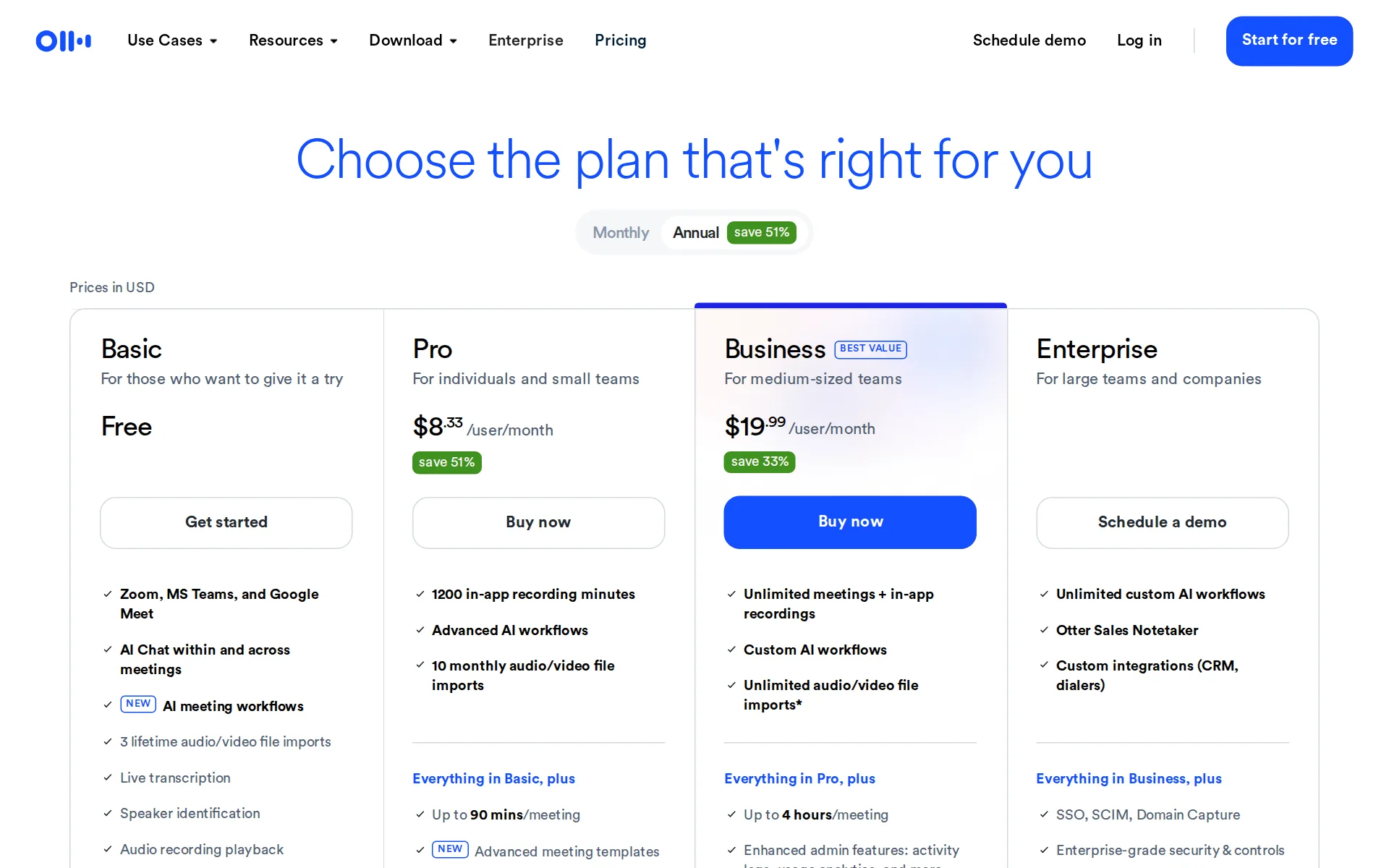
Pricing page, captured
otter.ai/pricing, checked
What we checked on Otter.ai
What the price counts
Self-serve paid plans are billed per user per month, while Enterprise is sold through a demo.
$16.99 /user/month
otter.ai/pricingChecked
Free tier
A standing Basic plan is free and includes meeting transcription, AI Chat, and monthly minutes.
Basic For those who want to give it a try Free
otter.ai/pricingChecked
Self-serve signup
Individuals can start on Basic or purchase Pro and Business directly, without a sales conversation.
Get started
otter.ai/pricingChecked
Contract
Self-serve subscriptions can use one-month or one-year periods, while Enterprise commercial terms are not published.
one month or one year depending on the selection you make on your account
otter.ai/terms-of-serviceChecked
Cancel any time
Direct Otter subscriptions can be canceled anytime, but remain active through the current paid billing period.
Cancel your Otter Pro subscription at any time from your workspace billing settings.
Works with
Basic includes Zoom, Microsoft Teams, Google Meet, and Slack; paid and enterprise integrations extend to CRM and workflow tools.
Basic Integrations (Zoom, Google Meet, Teams, Slack)
otter.ai/pricingChecked
Public API
Otter lists its API and webhooks on Enterprise, so this programmatic surface is not a self-serve plan feature.
Otter API & Webhooks
otter.ai/pricingChecked
MCP server
Otter operates an OAuth-authenticated MCP server that lets compatible assistants search and fetch authorized meeting knowledge.
All access is OAuth-authenticated with granular permissions.
Acts on its own
The service can automatically capture assigned next steps and push extracted sales details into connected CRM workflows.
Clear next steps are automatically captured and assigned from every meeting.
otter.aiChecked
Limits on what it may do
MCP access has granular permissions, while organization-wide access policies and sharing controls are described for Enterprise.
Centrally configure access policies, workspace permissions, content sharing rules, and security settings
otter.ai/enterpriseChecked
No training on your data
Enterprise organizations can opt their data out of AI model training through their account manager; no universal setting is published.
Keep your organization's data out of AI model training. Contact your account manager to get started.
otter.ai/enterpriseChecked
Retention you control
Users can delete conversations manually, while items left in Trash are automatically deleted after thirty days.
Otter automatically deletes conversations from the trash after 30 days.
otter.ai/privacy-securityChecked
Take your data out
Conversations can be exported to connected Google Drive as Google Docs or text files, with selectable conversation content.
Export your conversation as a Google Doc or text (.txt) file
Security audits
Otter says it has achieved a SOC 2 Type 2 report and works with an independent auditor to maintain it.
has achieved SOC 2 Type 2 report against stringent standards
otter.ai/privacy-securityChecked
Single sign-on
SSO and SCIM integration are listed as Enterprise capabilities, rather than features in the self-serve plans.
SSO, SCIM, Domain Capture
otter.ai/pricingChecked
Audit log
Business includes activity logs, while Enterprise describes audit trails and logging for compliance and reporting needs.
Maintain visibility into account activity with audit trails and logging
otter.ai/enterpriseChecked
Otter.ai alternatives
- This spot is openBe the first tool people see on Otter.ai's page.
- First on your rivals' pages
- Top of your category
- First in the home page list
- First in search results
- In comparisons and guides
- In the weekly newsletter
- Visits and AI reads each month
Otter.ai and Granola
Otter.ai beside its alternatives: the price on each one's site, all checked 29 Oct Tool Price Otter.ai Free, then $16.99 a seat a month Granola Free, then $14 a seat a month All checked

Questions about Otter.ai
- How much does Otter.ai cost?
- Otter.ai is free to use. From otter.ai/pricing, checked 29 October 2026.
- Does Otter.ai have an API or an MCP server?
- It has an API on Enterprise. It has an MCP server.
- What have we checked on Otter.ai?
- 16 facts, under these headings: What it costs to start, what it works with, what it does on its own, what happens to your data, whether a company can buy it.
- How do we check Otter.ai?
- We hold 16 facts on Otter.ai, quoted from 8 pages. Facts and price last checked 29 October 2026.
Sources and changes
Last changed
Is this yours?
AI assistants like ChatGPT, Claude and Perplexity opened AgentsIndex pages 1,190 times from 17 October to 30 October. Claim it free, then see who reads this page and carry the verified owner mark. You confirm it with an email at otter.ai.
Report an error if a fact is wrong.