AI Agent Definition: Complete Guide
A clear, plain-English guide to the AI agent definition, what an agent is not, and how to compare agents with chatbots, assistants, automation, and LLMs.

Written by AgentsIndex
Last updated April 20, 2026
An AI agent is a system that can perceive, decide, act, and adapt toward a goal with limited human intervention. That definition matters now because the category is growing fast, and buyers need a clear way to separate agents from chatbots, assistants, automation, and plain LLMs before they compare tools.
This guide gives a practical definition and the distinctions that matter.
An AI agent is a system that can perceive, decide, act, and adapt toward a goal with limited human intervention. That is the shortest useful definition, and it is the one readers can keep in their head while they compare products.
In plain English, it is software that can work toward a goal without waiting for every step from a person. AI Academy, "Understanding AI Agents: From Fundamentals to Implementation" reduces the idea to three parts: tools and actions, decision making and planning, and autonomy.
An AI agent is software that can pursue a goal, choose actions, and use tools or feedback to keep moving. To separate the category from chatbots and LLMs, look for autonomy, memory, and action-taking. The clearest test is simple: if it cannot act, it is not really an agent.
Agentic AI usually refers to the broader approach or system design, while an AI agent is the acting component inside that design. That distinction keeps the terminology clean when vendors use the same words to mean different layers.
AI agent vs chatbot is the comparison most readers need first. A chatbot is mainly built to respond in conversation, while an AI agent is designed to decide what to do next, call tools, and work toward a goal with less step-by-step prompting. That difference matters because many products look similar on the surface but behave very differently in practice.
AI agent vs LLM is a useful distinction for builders. An LLM is the model that generates language, while an AI agent is the system around it that can plan, retrieve information, trigger actions, and check results. In other words, the model can write the answer, but the agent can also decide to search, call an API, or repeat the task when the first attempt fails.
What is an AI agent is best answered as a system, not a single model. It usually combines a goal, a reasoning loop, memory, and access to tools, which is why agent platforms, frameworks, and runtimes are often discussed together in research and product pages from sources like Google Cloud and AWS. The practical question is whether the system can perceive, decide, act, and adapt without constant human micromanagement.
What is an AI agent?
An AI agent is a system that can perceive, decide, act, and adapt toward a goal with limited human intervention. Google Cloud frames the architecture around six core components, while AWS describes the same idea as a perceive-reason-act loop with memory and tool use.
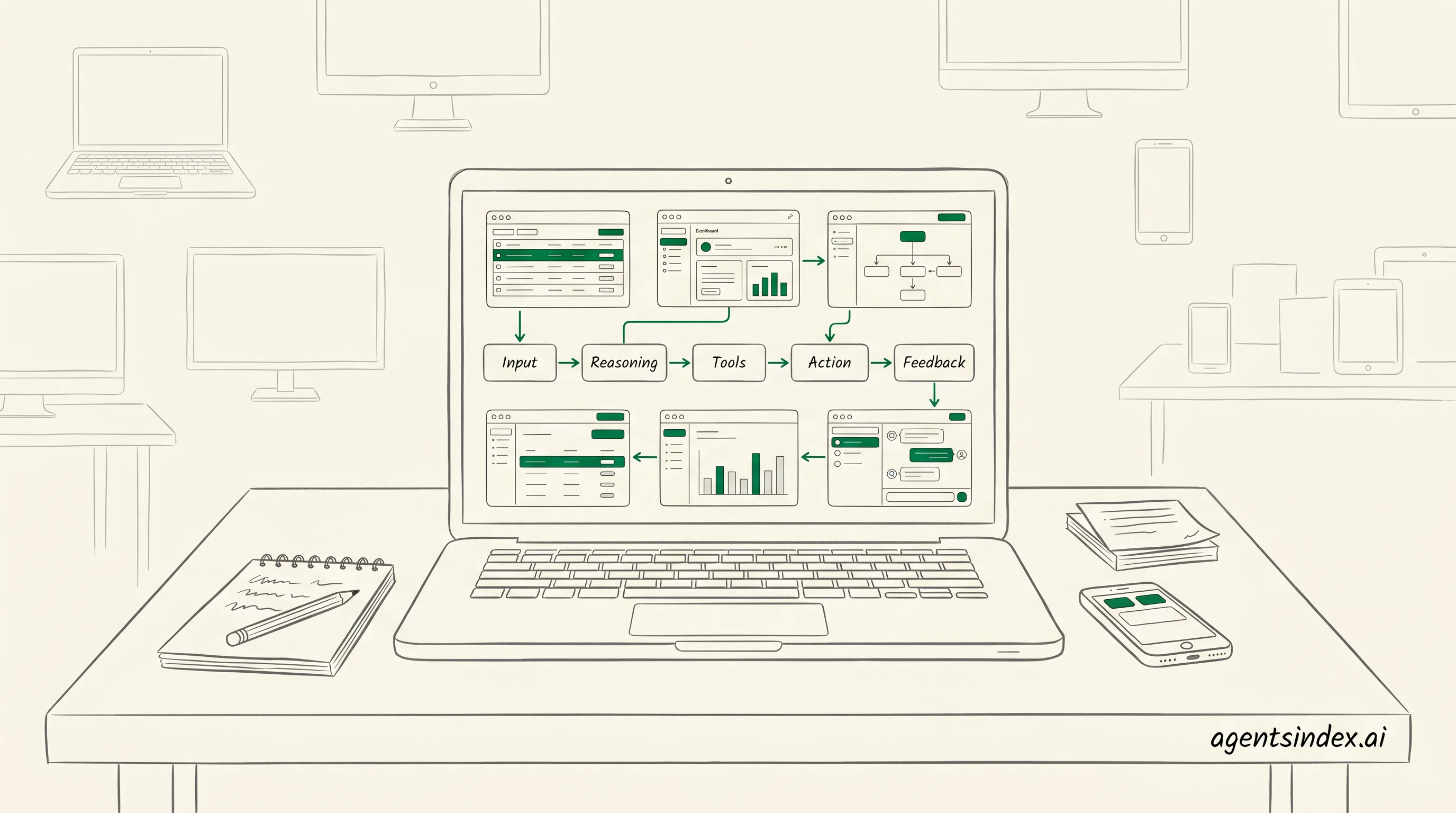
A simple agent loop helps separate agents from one-shot chat.
What do you mean by an AI agent? In practice, it is software that can take in context, choose a next step, use a tool, and keep working toward an outcome without waiting for every move from a person. If it only answers, it is not enough.
That simple definition matters because the category gets blurred fast. A chatbot can answer questions, but an agent can choose actions, call tools, and adjust after feedback, which is why the minimum-requirements test is so useful.
The minimum requirements test is blunt on purpose: if a system cannot choose actions, use tools, or iterate toward a goal, it is not an AI agent. AI Academy, "Understanding AI Agents: From Fundamentals to Implementation" describes agents as combining tools and actions, decision making and planning, and autonomy, which lines up with that test.
| Element | What it means | Why it matters |
|---|---|---|
| AI agent | Perceives a goal, decides what to do, uses tools, and adapts | Can move beyond conversation into task execution |
| Chatbot | Responds to prompts in a conversational flow | Usually waits for the next user message |
| Assistant | Helps with requests, often inside a product | May assist without independent planning |
| Automation | Runs predefined steps when triggered | Follows rules, but does not reason broadly |
| LLM | Generates and transforms language | Provides intelligence, not agency by itself |
A plain-English definition
In plain English, an AI agent is software that can work toward a goal without waiting for every step from a person. AI Academy reduces the idea to three parts: tools and actions, decision making and planning, and autonomy, which makes the concept easier to teach.
That is also why the definition should stay behavior-based, not brand-based. A tool can look impressive and still fail the test if it cannot choose actions or iterate toward an outcome. In 12 years running paid-media teams, I have found that the clearest systems are the ones people can explain in one sentence.
The minimum requirements test
The minimum requirements test is straightforward: if a system cannot choose actions, use tools, or iterate toward a goal, it is not an AI agent. That rule cuts through the noise around chatbots, copilots, and workflow tools, and it matches the gap the search results leave open.
What does that mean in practice? The system needs a goal, some way to perceive context, a planning step, an action step, and feedback that changes the next move. AWS's perceive-reason-act framing and Google Cloud's component model both support that interpretation.
A short citation-ready capsule
An AI agent is a system that can perceive, decide, act, and adapt toward a goal with limited human intervention. Google Cloud describes six core components, and AWS describes a perceive-reason-act loop with memory and tool invocation.
For buyers and builders, the useful question is not whether a product sounds intelligent. The better question is whether the system can select actions, use tools, and improve its next step from feedback. If it cannot, the label is probably doing too much work.
How is an AI agent different from a chatbot, assistant, automation, or LLM?
AI agents differ because they can plan, choose actions, and use tools, while a chatbot mostly responds in conversation. Google Cloud's research says AI agents have six core components, including models, grounding, tools, data architecture, orchestration, and runtime, which is why the label signals more than chat alone.
That distinction matters because the same interface can hide very different behavior. An LLM can generate text, but an agentic wrapper can turn that text into steps, memory, and tool calls, which is the gap buyers miss most often. If the system cannot choose actions, use tools, or iterate toward a goal, it is not an AI agent.
| Term | Primary purpose | Autonomy | Tool use | Typical output |
|---|---|---|---|---|
| AI agent | Works toward a goal | Chooses next steps | Uses tools and actions | Completed tasks, decisions, or multi-step results |
| Chatbot | Answers questions in dialogue | Low | Usually limited or none | Replies in conversation |
| Assistant | Helps with requests | Moderate | May use tools | Drafts, reminders, summaries, or simple actions |
| Automation | Runs a fixed workflow | None or very low | Uses predefined steps | Repeatable process output |
| LLM | Generates language | None by itself | None by itself | Text, code, or other generated content |
AI agent vs chatbot
A chatbot keeps the interaction centered on conversation, while an AI agent can move beyond replies and decide what to do next. That is why a chatbot can answer a policy question, but an agent can also fetch a document, compare options, and draft a follow-up. AWS Prescriptive Guidance describes agents as perceive-reason-act systems with memory and tool invocation.
So what changes in practice? The chatbot waits for the next prompt, but the agent can pursue a goal across steps, which is why the same product can feel passive in one mode and active in another. Google Cloud's framing and AWS's loop both point to the same boundary: action, not just language.
AI agent vs assistant
An assistant usually helps a person complete a task, while an agent can take on more of the task flow itself. In the market, that difference often shows up in how much the system decides versus how much the user directs. The assistant may draft and suggest, but the agent can sequence work and call tools without waiting for every instruction.
Agentic AI usually refers to the broader approach or system design. An AI agent is the acting component inside that design. That distinction keeps the terminology clean when vendors use the same words to mean different layers.
In plain terms, an assistant is often user-led, and an agent is more goal-led. That is why the label alone is not enough. A product called an assistant may still behave like a chatbot, while a well-built agent may look simple on the surface and do much more underneath.
AI agent vs automation
Automation follows rules, while an AI agent can adapt when the path changes. A scripted workflow is excellent for repeatable work, but it breaks when inputs shift or a decision is needed. Google Cloud's agent components and AWS's tool invocation model both explain why agents are built for flexible execution, not just fixed steps.
That difference is easy to miss in demos. If the system only triggers a preset action, it is automation. If the system evaluates context, picks a tool, and changes course, it is acting more like an agent. The distinction is practical, not semantic.
AI agent vs LLM
An LLM generates content, but an AI agent uses a model plus memory, tools, and planning to do work. The model is the engine, not the whole vehicle. Google Cloud's six-part view and AWS's perceive-reason-act loop both show why an LLM alone cannot explain agent behavior.
For example, an LLM can write a travel email, but an agent can search flights, compare times, and update the calendar. That is the cleanest way to separate them: one predicts outputs, the other pursues outcomes. If the system cannot choose a next step, it is not acting like an agent.
AI agent app is a useful label, but it does not prove agentic behavior. The app still needs goal-directed action, tool use, and some form of planning before the name means much. That is the simplest test for buyers who are comparing products quickly.
AI agents explained
This short video gives a visual walkthrough of how AI agents work and why they are different from ordinary chatbots.
What are the core components of an AI agent?
Google Cloud breaks the system into six parts: model, grounding, tools, data architecture, orchestration, and runtime, while AWS frames the same idea as a perceive-reason-act loop with memory and tool use. That split is useful because it shows the agent is a system, not just a model prompt (Google Cloud, AI Academy, AWS).
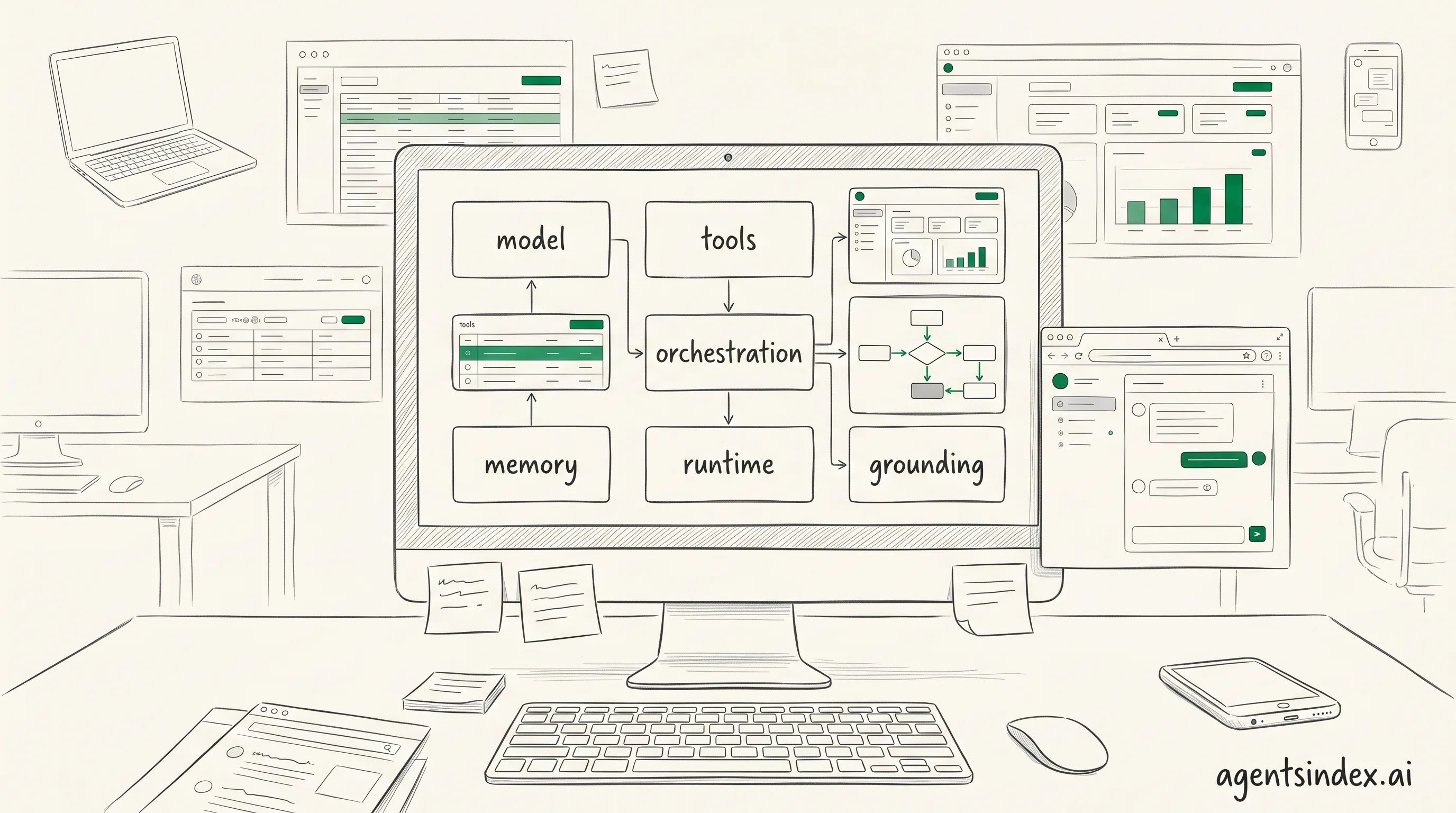
Most agents combine a model with tools, memory, and orchestration.
| Component | Plain-language role | Example |
|---|---|---|
| Model | Interprets input and helps choose the next step | Language model that reasons over a task |
| Grounding | Ties output to trusted context | Approved business data or live records |
| Tools | Let the agent do something outside the model | Search, API calls, ticket creation |
| Data architecture | Organizes the information the agent can use | Databases, retrieval layers, knowledge stores |
| Orchestration | Coordinates steps and decisions | Workflow logic or agent controller |
| Runtime | Executes the loop in a live environment | Hosted service or agent framework |
Each part answers a different question. What decides, what can it do, what does it remember, and how does it stay on task? Once those jobs are separated, the design becomes easier to compare across vendors and use cases.
Model and tools
The model is the reasoning core, but it does not act alone. Google Cloud places the model beside grounding and orchestration, and AWS pairs decision making with tool invocation, which is why a useful agent can search, call APIs, or trigger workflows instead of only generating text. Without tools, the system can think but not do.
Tools and actions are the hands of the agent. A tool might query a database, send a message, create a ticket, or run code, and AWS describes this as the action side of the loop. Google Cloud's framing makes the same point from another angle: the model needs an external path to affect the world.
Memory, data, and grounding
Memory and data give the agent context across steps, sessions, or tasks. AWS includes memory and learning in its module view, while Google Cloud separates grounding and data architecture, which helps explain why good agents need both stored context and trusted reference data. A system that forgets too quickly or reads weak inputs will drift.
Grounding keeps outputs tied to real sources, current state, or approved business data. That matters because the model can sound confident even when the underlying answer is thin. Grounding is the check that asks, "Is this answer anchored in something real?"
AI Academy, "Understanding AI Agents: From Fundamentals to Implementation" is useful here because it separates autonomy from the tools and actions that make autonomy useful. A system can sound smart and still fail if it cannot ground its next move.
What is an AI agent not?
Rule-based bots fall short because they follow fixed if-then logic, while real agent systems need broader decision-making and tool use. Google Cloud describes AI agents as involving models, grounding, tools, data architecture, orchestration, and runtime, which is far beyond a simple rules engine. AWS Prescriptive Guidance, "Core building blocks of software agents" also frames software agents around a perceive-reason-act loop, so a bot that only matches triggers and returns canned replies does not qualify.
| System type | Why people confuse it with an agent | Why it falls short |
|---|---|---|
| Rule-based bot | It can respond automatically | It follows fixed logic and does not reason broadly |
| Scripted workflow | It can complete repeatable tasks | It does not adapt when the path changes |
| Plain chat interface | It feels conversational and responsive | It may not plan or act outside the chat |
| AI-branded app | The label sounds advanced | The branding does not prove autonomy or tool use |
Not every app with AI branding is an agent either. If the product only wraps a model in a chat box, it is still a chat experience. If it cannot choose, act, and evaluate, the label is doing the heavy lifting.
That distinction matters because the market is crowded with products that borrow the word.
How does an AI agent work step by step?
Perception comes first, because the agent needs input before it can do anything useful. AWS Prescriptive Guidance, "Core building blocks of software agents" describes a perceive-reason-act loop with perception, cognitive module, memory and learning, and tool invocation, while Google Cloud frames agents around models, grounding, tools, data architecture, orchestration, and runtime. That structure makes the sequence easy to remember and easy to explain.
- Perceive. 2. Reason and plan. 3. Act. 4. Evaluate and iterate. That simple loop is the easiest way to explain how an agent moves from input to outcome.
Here is the short version: the agent takes in context, decides what matters, uses a tool, checks the result, and then either stops or tries again. That perceive-reason-act-feedback loop is the cleanest mental model for readers who want the concept without the jargon.
What happens after the first signal arrives? The agent does not jump straight to output. It gathers context, checks the task, and decides what matters next. That is why the lifecycle is better shown as a numbered flow than as a vague definition.
Perceive
Perceive means the agent collects signals from a prompt, an API, a file, a database, or another system. In AWS Prescriptive Guidance, perception is the entry point that feeds the cognitive module, and Google Cloud's framework adds grounding so the agent can anchor its response in relevant data. Without that step, the rest of the loop has nothing reliable to work with.
Why does this matter in practice? Because the quality of the input shapes every later decision. A weak signal leads to shallow reasoning, while a grounded signal gives the agent a better chance of choosing the right tool and the right next move. The lifecycle starts here, not at generation.
Reason and plan
Reasoning turns the gathered context into a plan. AWS Prescriptive Guidance points to a cognitive module, and Google Cloud separates planning from the rest of the stack, which helps explain why agents can break a task into steps instead of answering in one pass. This is where the agent decides whether to search, call a tool, or ask for more context.
That planning stage is also where the loop becomes more than a chatbot flow. The agent weighs options, predicts the next step, and chooses an action path. In 12 years of running paid-media teams, the clearest systems have always been the ones that make the decision step visible, because teams can then see where errors start.
Act
Action is the part people notice, but it is only one step in the sequence. The agent invokes a tool, writes to a system, sends a message, or triggers a workflow, and AWS Prescriptive Guidance explicitly includes tool invocation in the loop. Google Cloud's view of tools and runtime also shows that action depends on the surrounding architecture, not just the model.
That distinction matters because action is not the same as autonomy. An agent can act only after it has perceived and reasoned, and the action usually lands in an external system. If the system is well designed, the action is traceable, repeatable, and easier to audit later.
Evaluate and iterate
Evaluation closes the loop by checking whether the action worked. The agent compares the result with the goal, updates memory or state, and decides whether to stop or try again. Google Cloud's emphasis on orchestration and runtime fits this stage well, because the loop needs coordination, not just output.
This final step is what separates a one-shot response from an agentic workflow. The loop can repeat until the task is done, which is why the lifecycle is best remembered as perceive, reason, act, feedback. If the output misses the mark, the agent should learn from the miss, not simply repeat it.
What are the main types of AI agents?
Reactive agents, goal-based agents, utility-based agents, learning agents, and multi-agent systems are the most practical buckets to use, even though no single taxonomy is universal. Azumo AI Insights says vertical AI agents are expected to grow at the highest CAGR of 62.7% from 2025 to 2030, which is a good reminder that the market is already fragmenting by use case.
Google Cloud's core concepts and AWS Prescriptive Guidance both frame agents around behavior, planning, and tool use, so the cleanest way to classify products is by how they decide and act. Which category matters most? Usually the one that matches the workflow, not the label on the homepage.
| Type | How it behaves | Best for |
|---|---|---|
| Reactive agents | Respond to current inputs with little or no memory | Simple, fast tasks with clear triggers |
| Goal-based agents | Choose actions that move toward a defined objective | Workflows with a clear target outcome |
| Utility-based agents | Compare options and favor the highest expected payoff | Tradeoff-heavy decisions |
| Learning agents | Improve from feedback and past outcomes | Changing environments and repeated use |
| Multi-agent systems | Several agents coordinate or specialize across tasks | Complex work that benefits from division of labor |
Reactive and goal-based agents
Reactive agents are the simplest to spot because they answer the current situation without much internal planning. Goal-based agents go a step further, because they select actions that move toward a target, which makes them easier to compare against product claims from Google Cloud and AWS.
Vertical AI agents are expected to grow at the highest CAGR of 62.7% from 2025 to 2030, according to Azumo AI Insights. That is a useful signal because it shows the market is splitting by use case, not just by model family.
What are the top 3 AI agents? There is no universal top-three list, because the better question is which type fits the job. For many teams, the practical shortlist is reactive for simple triggers, goal-based for task completion, and learning agents when the workflow changes often.
That distinction helps when a vendor says
Is ChatGPT an AI agent?
ChatGPT by itself is usually better described as a conversational model and interface, not a full agent, though agentic systems can be built around it with tools, memory, and action loops (Google Cloud, "Core concepts of AI agents"). The distinction matters because the same chat window can feel agent-like while still lacking the autonomy, planning, and external action that define an agentic setup.
Is Claude an AI agent? Not by default. Like ChatGPT, it can be part of an agentic system if developers add tools, memory, and orchestration. The product name alone does not tell you whether the system can act.
The model layer generates responses, the interface shapes the conversation, and the wrapper decides whether the system can search, call tools, or carry tasks forward. Google Cloud describes AI agents as combining models, grounding, tools, data architecture, orchestration, and runtime, while AWS frames agents around perceive-reason-act behavior with memory and tool invocation. Which layer are you actually evaluating when you ask the question?
The model
The base model is the part that predicts and writes text. On its own, that is not enough to count as an agent, because an agent needs some way to choose actions, use tools, and persist toward a goal. Google Cloud's framework and AWS Prescriptive Guidance both separate raw model output from the surrounding system that makes action possible.
That separation helps explain why people talk past each other in product reviews. One person means the language model, another means the product experience, and a third means a tool-using system that can act across steps. If those layers are blurred, the label becomes more marketing than analysis.
The interface
The chat interface is what most users see, and it can create the impression of agency. A polished conversation can answer follow-up questions, remember context within a session, and feel responsive, but that still does not guarantee independent planning or tool use. AI Academy's breakdown of agents emphasizes decision making, planning, and autonomy, which are separate from a chat box.
That is why the same product can be described differently depending on the feature set. If the interface only mediates text exchange, it is closer to a chatbot. If the interface can trigger tools, maintain memory, and continue toward a task, the system moves into agentic territory. The label should follow the behavior, not the branding.
The agentic wrapper
An agentic wrapper is where ChatGPT can become part of an actual agent system. When developers add retrieval, tool calls, memory, and orchestration, the system can plan, act, observe results, and keep going. That is the meaningful distinction for buyers and builders, because the wrapper determines whether the product merely chats or actually completes work.
So the clean answer is this: ChatGPT alone is not usually an AI agent, but ChatGPT can be the model inside one. The practical test is simple: does the system just respond, or can it decide, use tools, and carry a task forward with some autonomy? That is the line Google Cloud, AWS, and AI Academy all point toward.
Why does the AI agent definition matter for buyers and builders?
Definition clarity changes buying decisions because the market is already moving fast, with 62% of organizations at least experimenting with AI agents, according to Azumo AI Insights. When buyers cannot separate a real agent from a chatbot or workflow wrapper, platform comparisons get noisy and budgets drift toward vague promises instead of usable capabilities.
Use an AI agent when the task needs planning, tool use, and adaptation across steps. Use a chatbot when the need is mostly conversation, an assistant when the work is narrow and user-led, and automation when the process is fixed and predictable.
AI agent examples are easiest to understand when they are tied to work, not hype. Research and summarization, personal assistants, ticket routing, and internal workflow support are common examples because they combine context, tool use, and a clear next step.
That confusion is costly for builders too, because the same label can hide very different architectures. Gmelius reports that use of AI agents in enterprise software is projected to grow from 1% in 2024 to 33% by 2028, while Landbase says 79% of organizations already have some AI agent adoption and 96% plan expansion in 2025. Which product category are teams actually evaluating if the term stays loose?
Companies are also 24% more likely to build internal agents than customer-facing ones, according to the Merge/PwC study. That suggests many buyers care more about orchestration, access control, and integration depth than a polished front end.
| Signal | What it suggests | Source |
|---|---|---|
| 62% experimenting or scaling | The category is moving from curiosity to active evaluation | Azumo AI Insights |
| 79% adoption with 96% planning expansion | Buyers are likely to revisit platform choices soon | Landbase |
| 1% to 33% in enterprise software | Definitions now affect architecture and procurement, not just terminology | Gmelius |
| 171% average ROI | Investment scrutiny rises when outcomes look material | Landbase |
| 24% more likely to build internal agents | Deployment choices are tilting toward workflow support | Merge/PwC study |
Choosing the right platform
A precise AI agent definition helps teams compare platforms on the right criteria, not on branding. Merge/PwC study found companies are 24% more likely to build internal agents than customer-facing ones, which suggests many buyers need orchestration, access control, and integration depth more than a polished front end. Google Cloud also frames agents around models, grounding, tools, data architecture, orchestration, and runtime, which is a better lens for evaluation than feature lists alone.
Setting realistic expectations
Expectation setting matters because agentic AI is broader than a single acting component. The terminology note is simple: agentic AI usually refers to the broader approach or system design, while an AI agent is the acting component. That distinction helps teams avoid buying a chat layer and calling it autonomy.
Frequently Asked Questions
What do you mean by an AI agent?
An AI agent is software that can perceive context, decide what to do next, act through tools, and adapt based on feedback. It is more than a chat interface because it can pursue a goal across steps. If it cannot choose actions, it is not really an agent.
What are the 5 types of AI agents?
A practical taxonomy usually includes reactive, goal-based, utility-based, learning, and multi-agent systems. These labels are useful for comparison, but they are not a universal standard, and different sources group agent types differently. The key idea is how much the system senses, plans, learns, and coordinates, according to IBM.
AI agent components
The core components usually include a model, tools, memory, grounding, orchestration, and runtime. Google Cloud describes six core components, while AWS Prescriptive Guidance describes a perceive-reason-act loop with memory and tool invocation. The exact stack varies, but the jobs stay similar.
AI agent vs Agentic AI?
Agentic AI is the broader behavior or system design, while an AI agent is the component that takes goal-directed actions. Put simply, agentic AI describes the overall approach, and an AI agent is the actor inside it. IBM describes agentic systems as combining reasoning, planning, and action.
AI agent vs LLM?
An LLM generates text, while an AI agent uses a model plus tools, memory, and planning to pursue a goal. For example, a model can draft an email, but an agent can decide to check a calendar, gather context, and send a follow-up. IBM notes that agentic systems extend beyond text generation.
AI agent vs chatbot?
A chatbot is conversation-first, while an AI agent is action-oriented. A chatbot can answer questions without choosing next steps, but an agent can decide what to do and use tools to do it. IBM distinguishes chat interfaces from systems that can reason, plan, and act.
How to create an AI agent?
At a high level, an AI agent needs a model, a goal, tools, memory, and a way to evaluate actions. The exact build depends on the use case, so readers should look to implementation guides and platform documentation for the technical steps. IBM frames these as core parts of agentic systems.
Is Claude an AI agent?
Claude is not automatically an AI agent just because it can chat well. It becomes agent-like only when developers add tools, memory, orchestration, and a loop that lets it act on a goal. The label should follow the behavior, not the brand.
AI agent examples
Common examples include research assistants, support triage systems, scheduling helpers, and internal workflow agents. These systems usually combine context, tool use, and a clear outcome. The best examples are the ones that finish work, not just talk about it.
Conclusion
An AI agent is software that can interpret a goal, choose actions, and keep moving toward an outcome with limited hand-holding. That is what separates it from a simple prompt responder or scripted workflow. The market signal is strong too: the AI agents market is valued at $7.63 billion in 2025 and projected to reach $182.97 billion by 2033 at a CAGR of 49.6% (Azumo AI Insights).
North America holds 39.63% of global AI agents market revenue in 2025, and 58.2% of organizations cite research and summarization as a top use case, followed by personal assistants and productivity at 53.5%, according to Gmelius and Azumo AI Insights. Those signals explain why the definition matters for both product teams and buyers.
The right choice depends on the job. Use an AI agent when the task needs planning, tool use, and adaptation across steps. Use a chatbot when the need is mostly conversation, an assistant when the work is narrow and user-led, and automation when the process is fixed and predictable. The quickest test is simple: if the system must decide what to do next, you are probably looking at an agent.
If you want to go deeper, the next useful question is how agents are built and evaluated in practice. Our Guides cluster can help you compare the core components, common agent types, and the boundary between an agent and a plain LLM so you can choose the right architecture with less guesswork.