
At a glance
- Categories
- Conversation intelligenceAI meeting note takers
- Tags
- GDPR, SOC 2
Avoma in our research
All researchStudy
AI Tool Pricing Index, November 2026
Price in AI meeting note takers
$29a month
The priciest of the 5 tools with a monthly price.
Edition price, checked 12 November 2026.
Pricing pages of the AI tools, November 2026 editionas of n = 5 tools with a monthly price
A meeting recorder with revenue tooling layered on top
Avoma's base product records, transcribes and summarizes meetings, then files the notes into the CRM. The Startup plan card on the pricing page lists automatic video recording, unlimited real-time transcription, AI summary notes, AI email follow-ups, a dialer integration and auto-saving notes to CRM records. The comparison table names Salesforce, HubSpot, Zoho, Pipedrive and Copper for that, and Zoom, Microsoft Teams, Google Meet, WebEx and GoToMeeting for capture. It says Avoma "Supports both Bot-less Native Recording and Bot-based Recording", with a desktop app, a Chrome extension and iPhone and Android apps.
Everything past the note taker is sold separately. Call scoring, AI scorecards and coaching sit in a Conversation Intelligence add-on. Deal risk alerts, forecasting, win-loss analysis and 2-way CRM field updates sit in a Revenue Intelligence add-on, and advanced lead routing in a Lead Router add-on. A 1:1 scheduler comes with every plan, and group and round-robin scheduling start on Organization.
The pricing page opens on annual rates, not monthly ones
The pricing page loads with the Annual switch on, showing Startup at $19 and Organization at $29 per recorder seat per month, "Billed annually". Switching to Monthly shows $29 and $39, "Billed monthly". Enterprise reads $39 per recorder seat in both positions and "Billed annually only", with a minimum of 10 seats. The FAQ says "We offer up to 33% off when you choose Yearly billing and pay upfront on the base subscription plan."
The add-ons have a toggle of their own, labeled "Save up to 20%". Conversation Intelligence and Revenue Intelligence are $35 per seat billed monthly or $29 billed annually, and Lead Router is $25 or $19. The FAQ says add-ons "follow the same payment cycle as the subscription plan", so an annual base plan means annual add-ons. Add-ons can go to individual people, but every recording user must be on the same base plan.
Only recorder seats are paid: viewers and collaborators are free. Caps sit on the plans: Startup allows up to 25 recorder seats and Organization up to 100, and pre-recorded file uploads are limited to 5, 10 or 20 per user per month. Onboarding with an Avoma expert is listed as "Optional $1000 one-time". The same page says "no setup fees, no minimum platform fees" and that Avoma typically does not refund cancellations or unused licenses partway through a subscription.
Agents run on triggers and hand judgment calls to people
The agentic platform page describes agents that start when "A call ends, a deal is created, or a set day rolls around". They read calls and CRM records, update CRM fields, draft follow-ups and post to Slack or email. An agent is built from a prompt in Ask Avoma, with a trigger, if/else conditions, instructions and actions, and the page says "The routine stuff runs on its own, and judgment calls land on a person." Its sample activity feed shows a follow-up email waiting for the account executive's approval.
Access depends on the agent type. Personal agents see "All meetings you can access, including private meetings", while cross-team agents see "Organization and publicly visible meetings only."
The MCP server writes to meeting records as well as reading them
Avoma runs a remote MCP server at mcp.avoma.com for Claude and ChatGPT. The MCP page says assistants can pull transcripts, notes, action items and scorecards, and ask Ask Avoma questions. With write access on, agents can "classify meetings, log outcomes, and set privacy". A Settings page shows admins who has connected which AI tool, at what access level, and how many tool calls each has made.
It is not available on the entry plan. The Claude setup guide requires "an Organization or Enterprise plan, or have the API Access add-on enabled", plus a paid Claude plan. The API documentation says API access is "available on select plans", caps it at 60 requests per minute, and points to a reference at dev.avoma.com. The pricing table includes API Integration & Webhooks from Organization upward.
Security claims are strong, but two pages disagree with the rest
The security page says Avoma holds SOC 2 Type II and ISO/IEC 42001:2023 certifications and that all customer data, recordings and transcripts included, is encrypted at rest and in transit. Hosting is in AWS facilities in the USA. Audit logs start on Organization.
No Business plan appears on the pricing page. The same checklist says "On-premise deployment is not available" and offers EU residency only as something "the Avoma enterprise team can discuss".
On model training, the help center says "we don’t use any customer data to train our models." The privacy policy makes that promise only for Google Workspace API data, saying that data is not used to "train generalized AI or machine learning models". Elsewhere it says personal information is used "to make it better and to continue developing the Service".
Leaving means notice, no refund and a 30-day export window
Termination takes effect "at the end of the current subscription term" and "is not eligible for refund", which ties an annual buyer in for the full year. Customers may export their data during the 30 days after termination. The terms give no uptime percentage: Avoma says it "cannot guarantee that the Service will operate in an uninterrupted or error-free manner."
Some listed features are still marked Coming soon
The Organization plan card on the pricing page lists Custom AI Email Templates, while the comparison table below it marks that row "Coming soon". Top Themes under Conversation Intelligence carries the same label. Transcription is listed at "Supports 70+ languages" there. Review counts also vary between the vendor's pages: the agentic page shows "4.8/5 on G2 • 1300+ reviews" and the MCP page "500+ reviews".
Avoma suits sales and customer success teams that want call notes, CRM updates and agent workflows in one tool. It is a poor fit for a buyer who needs EU-hosted data on a published plan, on-premise deployment, or monthly billing with SSO, since Enterprise is annual only.
Avoma price and terms
Terms
- Free to start
- PartlyLimited free use14-day trial of the Organization plan with all add-ons, no credit card required, extendable by emailing support
- Card to start
- YesNot required
- Sign up without sales
- YesYes
The terms in full
Afterward the account becomes a free viewer that can watch past recordings but cannot record new meetings.
For AI agents
- MCP server
- PartlyOrganization or Enterprise or API Access add-onhelp.avoma.com,
- API
- PartlyOrganizationhelp.avoma.com,
What needs a higher plan
- Enterprise
- Contract, Retention you control, Single sign-on
- Organization
- Public API, Audit log
- Organization or Enterprise or API Access add-on
- MCP server
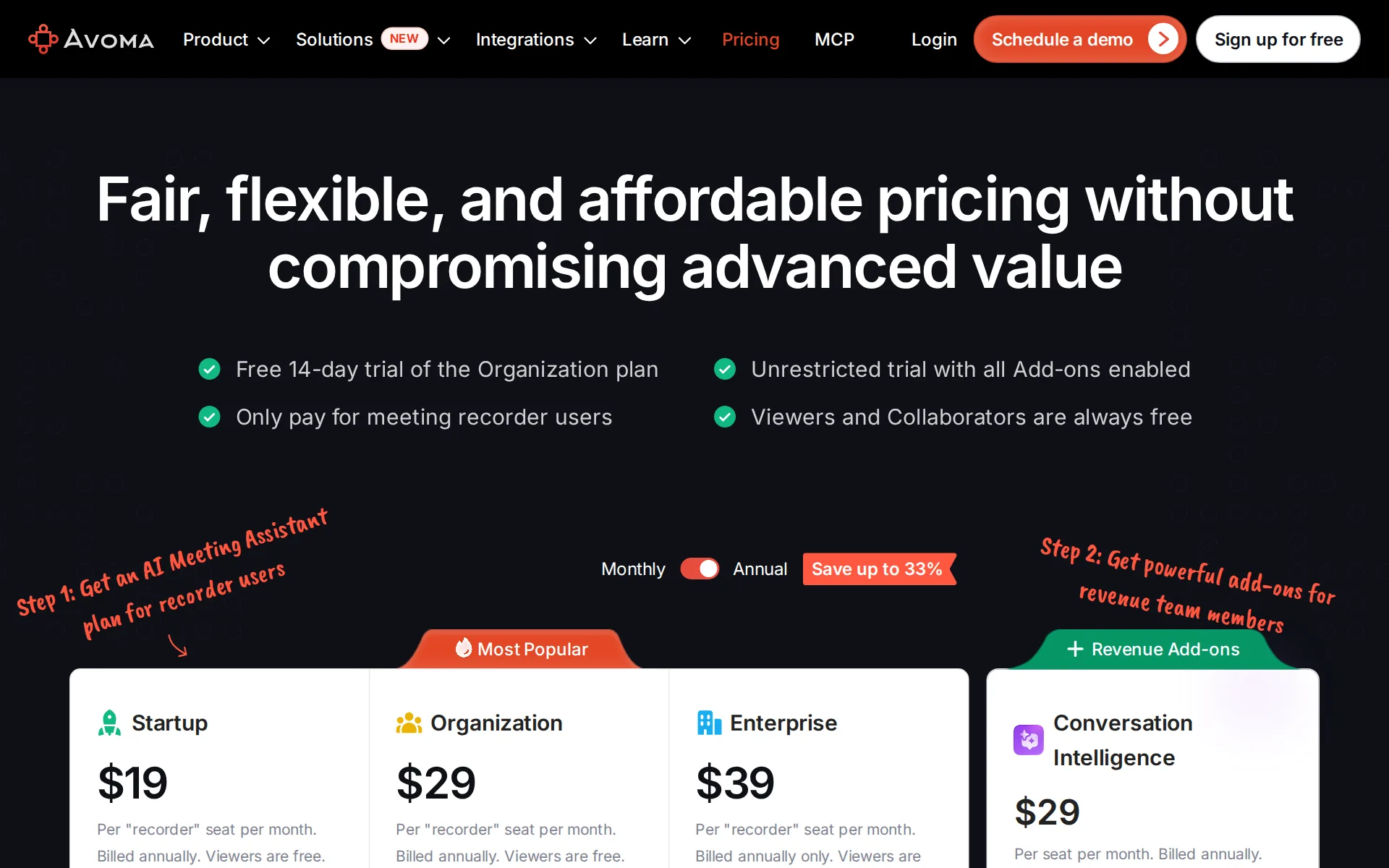
Pricing page, captured
avoma.com/pricing, checked
All plans and limits
| Plan | Price | Main limits |
|---|---|---|
| Free view-only seats | $0 per user a month | None stated |
| Startup | $29 per recorder seat a month or $19 per recorder seat a month, billed yearly | Pre-recorded file uploads: 5/user/month; Paid seats: Up to 25 seats; View-only seats: Unlimited |
| Enterprise | $39 per recorder seat a month | Pre-recorded file uploads: 20/user/month; Minimum paid seats: Minimum 10 seats |
| Organization | $39 per recorder seat a month or $29 per recorder seat a month, billed yearly | Pre-recorded file uploads: 10/user/month; Paid seats: Up to 100 seats |
Read from avoma.com and avoma.com/pricing.
What we checked on Avoma
What the price counts
Priced per recorder seat per month. Only people who record meetings need a paid seat, viewers and collaborators are free, and add-ons are also priced per seat.
On the page: Plan cards, Startup price cell
avoma.com/pricingChecked
Free to use
Avoma offers an unrestricted 14-day trial and continuing free viewer seats, but recorder users need a paid plan afterward.
Once your 14-day trial ends, your account switches to a Viewer role. You’ll still have access to past recordings, but won’t be able to record new…
avoma.com/pricingChecked
Self-serve signup
Startup and Organization plans start from a self-serve free trial with no sales call. Enterprise sends buyers to a demo instead.
No. You can sign up and use Avoma for 14 days without entering your payment details.
avoma.com/pricingChecked
Card to start
No card is needed to start the 14-day trial. Payment details are only asked for when a buyer decides to purchase seats at the end of it.
Unrestricted 14-day free trial of the Organization plan with all Add-ons enabled. No credit card is required.
avoma.com/pricingChecked
Contract
Startup and Organization can be billed month to month. Enterprise is billed annually only, needs at least 10 recorder seats, and add-ons follow the base plan's billing cycle.
Billed annually only. Viewers are free.
avoma.com/pricingChecked
Cancel any time
Customers can terminate for convenience with 30 days' notice, but cancellation takes effect after the current subscription term and is not refundable.
Upon thirty (30) days prior written notice, Customer may terminate the Terms, individual order forms, or individual subscriptions at its convenience.…
avoma.com/termsChecked
Works with
Avoma names Zoom, Google Meet, Microsoft Teams, Salesforce, HubSpot, Slack, ClickUp, and multiple calendar, CRM, and dialer integrations.
Automatically save notes to CRM records (Account, Opportunity, Contact) Supports Salesforce, HubSpot, Zoho, Pipedrive, Copper
avoma.com/pricingChecked
Public API
A documented REST API, with a reference at dev.avoma.com and scoped keys limited to 60 requests per minute. The comparison table includes it on Organization and Enterprise only, not Startup.
API access is available on select plans. Check the pricing page to confirm your plan includes API access.
MCP server
A remote MCP server at mcp.avoma.com connects Claude and ChatGPT over OAuth to read meetings and write purpose, outcome and privacy fields. It needs the Organization or Enterprise plan, or the API Access add-on.
Your Avoma account must be on an Organization or Enterprise plan, or have the API Access add-on enabled.
Acts on its own
Revenue agents can start from a meeting, a deal condition, or a schedule and perform configured workflow work without a person starting every run.
Avoma MCP lets AI agents classify meetings, log outcomes, and set privacy, keeping your data clean and your pipeline reporting accurate.
Limits on what it may do
Personal agents can use a person's accessible meetings, while cross-team agents are confined to organization and publicly visible meetings.
When creating your key, select the appropriate scope (user vs. organization, limited vs. full) based on the data your integration needs.
No code needed
The agent builder presents triggers, conditions, instructions, and actions as configuration choices rather than requiring users to write workflow code.
ChatGPT support is also available through OAuth, with no desktop installation or API key required.
No training on your data
Avoma states that customer meeting data is never used to train AI models and says enterprise agreements can confirm that commitment contractually.
No, we don’t use any customer data to train our models. Your data remains private and is never used to improve or refine AI systems.
Retention you control
Admins can set retention periods for recordings and transcripts, but the current pricing page places custom data retention policies in Enterprise security features.
On the page: Compare our plans table, Security section, row checked for Enterprise only
avoma.com/pricingChecked
Data stays in your region
All data is hosted on AWS in the United States. EU residency is not a published option, only something the enterprise team will discuss on request.
All data is hosted on AWS infrastructure in the United States within Avoma's own Virtual Private Cloud (VPC). For organizations requiring EU data…
Self-hosted
Avoma describes itself as cloud SaaS on AWS and expressly says on-premise deployment is unavailable.
Avoma is a cloud-based SaaS product hosted on AWS. On-premise deployment is not available.
Take your data out
Customers have a 30-day post-termination export window, and the help center documents downloads of recordings and transcripts in standard formats.
Avoma will return Customer Personal Data to Customer or delete such data within thirty (30) days after termination of the Services or sooner upon…
avoma.com/termsChecked
Security audits
Names SOC 2 Type II and ISO/IEC 42001:2023 certifications plus GDPR support. The pricing table adds mutually signed DPAs and HIPAA compliance, both on Enterprise.
We maintain SOC 2 Type II and ISO/IEC 42001:2023 certifications and support GDPR compliance.
avoma.com/securityChecked
Single sign-on
SAML or OIDC single sign-on is listed only on the Enterprise plan, which is annual-only with a 10-seat minimum. SCIM provisioning sits in the same security section.
Single Sign-On (SAML/OIDC)
avoma.com/pricingChecked
Audit log
Audit logs are bundled with granular access controls on the Organization and Enterprise plans. The Startup column leaves the row unchecked.
Granular access controls and audit logs
avoma.com/pricingChecked
Uptime promise
Avoma's public terms say it uses commercially reasonable availability efforts but explicitly does not guarantee uninterrupted or error-free service.
We use commercially reasonable efforts to maintain the highest Service availability. However, We cannot guarantee that the Service will operate in an…
avoma.com/termsChecked
Avoma alternatives
Avoma and its 2 alternatives
All 2 show a price.
Avoma beside its alternatives: the price on each one's site and the day it was checked Tool Price Checked Avoma From $29 a seat a month Fireflies.ai Free, then $18 a seat a month Granola Free, then $14 a seat a month


Questions about Avoma
- How much does Avoma cost?
- Avoma costs $29 a seat a month. From avoma.com/pricing, checked 12 November 2026.
- Does Avoma have an API or an MCP server?
- Avoma has an API on Organization. From help.avoma.com/api-documentation, checked 5 November 2026. Avoma has an MCP server on Organization or Enterprise or API Access add-on. From help.avoma.com/admins-add-avoma-mcp-connector-in-claude, checked 5 November 2026.
- Is Avoma open source, and can you host it yourself?
- You cannot host Avoma yourself. From avoma.com/blog/ai-notetaker-security-features, checked 29 October 2026.
- What have we checked on Avoma?
- 21 facts, under these headings: What it costs to start, what it works with, what it does on its own, what happens to your data, whether a company can buy it.
- How do we check Avoma?
- We hold 21 facts on Avoma, quoted from 12 pages. Facts last checked 5 November 2026. Price last checked 12 November 2026. Last change found 5 November 2026.
Sources and changes
Last changed
Sources12
- avoma.com/pricing
- avoma.com/blog/ai-notetaker-security-features
- avoma.com/agentic-ai-platform
- avoma.com/agentic-platform/mcp
- avoma.com/terms
- help.avoma.com/api-documentation
- avoma.com/security
- help.avoma.com/admins-add-avoma-mcp-connector-in-claude
- avoma.com/ai-meeting-assistant
- help.avoma.com/do-you-use-my-data-to-train-your-models
- avoma.com/integrations
- help.avoma.com/setup-up-single-sign-on-sso-with-okta-oidc-for-your-avoma-accounts
What changed1
- Free tier, what it does
Avoma price history
Plans for Avoma started at $29 a seat a month on all 10 of our reads, from 30 May 2025 to 12 November 2026.
| Price | Plan | First seen | Last seen | Readings | Source |
|---|---|---|---|---|---|
| $29 a seat a month | Conversation Intelligence | 30 May 2025 | 12 November 2026 | 10 | Pricing page, read 5 November 2026 |
From our research, read twice since 5 November 2026, 7 Internet Archive copies from 30 May 2025, and one of our own checks, on 6 November 2026. 2 more of our checks could not pick this price out of the page and are left out. A date is when we read the page, not when the price changed.
Is Avoma yours?
Free, and the page then carries the verified owner mark. You confirm it with an email at avoma.com. Claim this listing
Report an error if a fact is wrong.