
BILL combines payable work with payments and spend controls
BILL is a financial operations platform covering accounts payable, accounts receivable, spend and expense. Its accounts payable flow begins with invoice capture, then moves through approvals and payment processing. The product page says its AI codes multi line bills, captures invoice fields, and handles two and three way matching against purchase orders and receipts. Its payment rails include ACH, card, check, and international wire transfer. That makes this a finance operations system with AI inside payment and bookkeeping processes, rather than a standalone finance chatbot. BILL describes the AP workflow and lists the payment methods.
The AI features automate defined finance tasks with controls
The AI section describes work that happens within operating workflows. Invoice automation reads incoming invoices, extracts fields, and codes multi line bills. The W 9 feature is more agentic: BILL says it autonomously emails vendors to collect and enter W 9 forms. It also says unusual bill amounts are automatically flagged during approval. The same page says finance teams keep final decision making power and can turn AI capabilities on or off in a centralized hub with an audit log of AI actions. That combination places automated data work beside approval controls, rather than presenting the system as autonomous payment authority. The feature descriptions are on BILL's AI page.
Published plans start at 49 dollars per user monthly
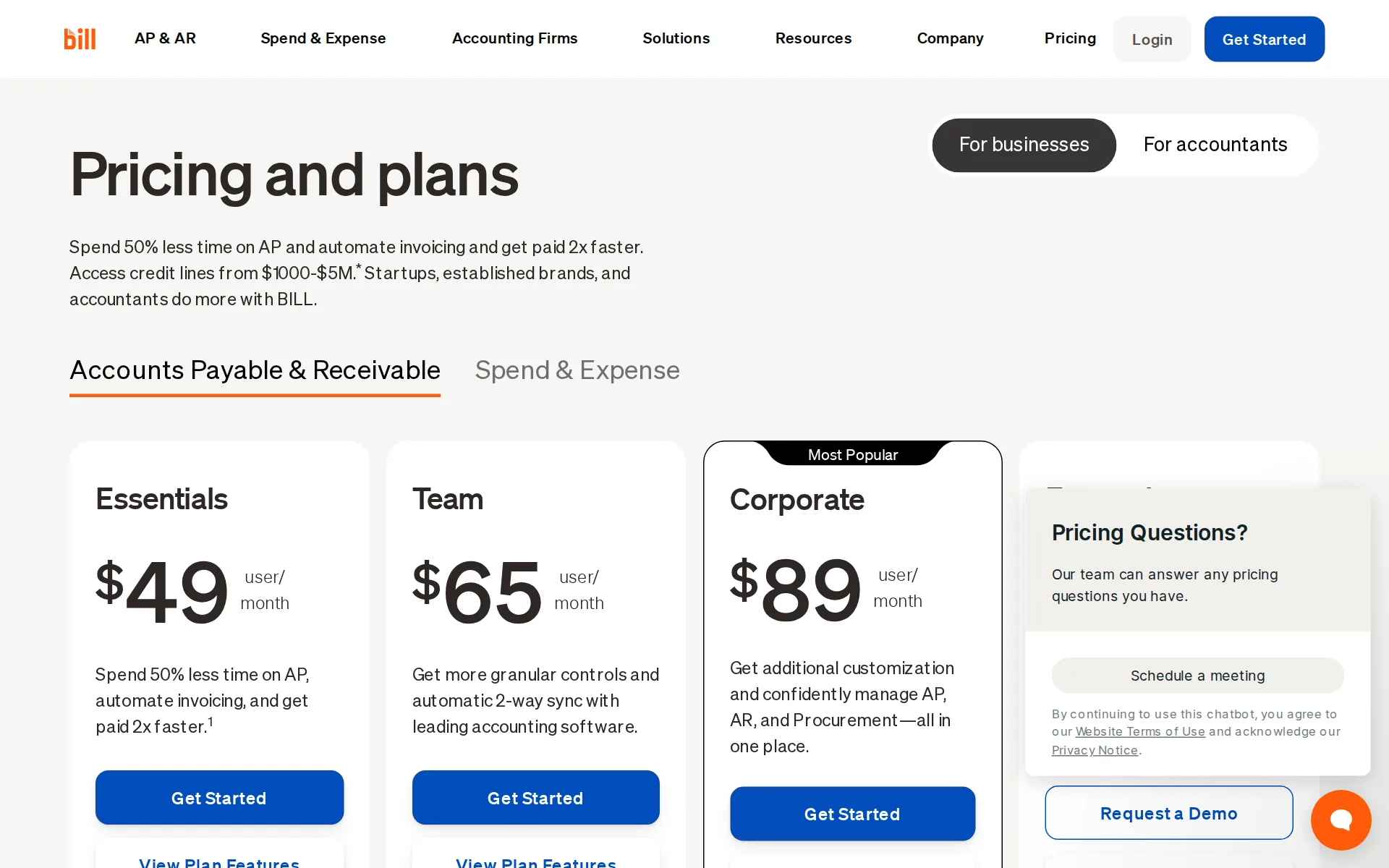
BILL publishes four business plan levels. Essentials is listed at $49 per user per month, followed by Team at $65 and Corporate at $89. Enterprise is custom priced. The comparison says the Invoice Coding Agent is not included in Essentials but is included from Team, so the cheapest subscription does not include every AI feature. Essentials can import and export CSV files. Team and Corporate add automatic two way synchronization for QuickBooks Online, QuickBooks Pro, QuickBooks Premier, and Xero. The API page separately says the BILL API is free to use. It does not turn the full accounts payable product into a free plan, but it is a free programmatic surface. The plans and comparison table are published here, and the API FAQ states its price.
Accounting connections range from CSV to enterprise synchronization
BILL's integration page names automatic two way synchronization for QuickBooks Online, QuickBooks Pro and Premier, QuickBooks Enterprise, Xero, Oracle NetSuite, Sage Intacct, and Microsoft Dynamics. It also describes import and export for other accounting systems and an API platform for custom integration. Pricing is more specific about plan position. The Enterprise card names QuickBooks Enterprise, Oracle NetSuite, Sage Intacct, and Microsoft Dynamics, while the lower Essentials plan is described as manual CSV import and export. The public API documentation covers AP, AR, spend, expense, webhooks, and embedded UI Elements. The integration FAQ lists the accounting systems, and the developer documentation describes the API platform.
Security materials describe controls and audits, not AI data terms
BILL's security page says it uses role based access, multi factor authentication, encryption in transit, and a timestamped AP audit trail. It says BILL undergoes annual SOC 1 and SOC 2 Type II audits. The privacy notice says it retains information as needed for its records policies, service administration, legal obligations, dispute resolution, and agreement enforcement. It also says information may be transferred outside a customer's country or region. Neither page documents a buyer selected data residency option, a self hosted deployment, or an AI model training exclusion. Those items remain undisclosed rather than negatives. The security controls are described in BILL's Security Center, and the retention and transfer language is in its Privacy Notice.
Cancellation is available but may wait for payments to finish
BILL's terms allow a customer to request account cancellation at any time. For subscription accounts, cancellation normally takes effect on the last day of the current billing cycle if there are no pending payments. If payments will not finish by then, the terms say cancellation can move to the end of the next cycle or until the final requested payment completes, whichever is later. The terms also say subscription fees are not prorated. The same terms permit BILL and its banking providers to maintain copies of uploaded data after cancellation where the agreement, privacy notice, or law permits it. These conditions appear in the cancellation section of BILL's terms.
BILL price and terms
Terms
- Free to start
- PartlyPartlyThe BILL API is free to use
The terms in full
paid financial operations plans start with Essentials at $49 per user monthly.
- Sign up without sales
- YesYes
What needs a higher plan
- Enterprise
- Works with
For AI agents
- MCP server
- Yes
- API
- Yes
Pricing page, captured
bill.com/product/pricing, checked
All plans and limits
| Plan | Price | Main limits |
|---|---|---|
| BILL Spend & Expense Partner | $0 a month | None stated |
| Spend & Expense | $0 per user a month | as many physical and virtual cards as you need |
| BILL AP & AR Partner | $49 a month | None stated |
| Essentials | $49 per user a month | Standard user roles: 6 user roles |
| Team | $65 per user a month | None stated |
| Corporate | $89 per user a month | Document storage: unlimited; unlimited purchase requesters |
| Enterprise | Price on request | None stated |
Read from bill.com/product/pricing.
What we checked on BILL
What the price counts
The entry paid plan is billed per user each month, rather than by completed payment outcome.
$49 user/ month
bill.com/product/pricingChecked
Free tier
Spend & Expense is $0 a user each month and stays free, and the paid AP and AR plans come with a free trial in most cases, so you can try before paying.
Yes, the BILL Spend & Expense plan is $0 per user per month and includes corporate cards, budgets, expense tracking, and access to credit lines from…
bill.com/product/pricingChecked
Self-serve signup
Essentials, Team and Corporate each carry a Get Started button and a published rate you can buy yourself, while Enterprise is custom priced and routes to Request a Demo.
Enterprise Custom Pricing Unlock enhanced security, premium support, multi-location accounting capabilities, and more. Request a Demo
bill.com/product/pricingChecked
Contract
Subscriptions renew each billing cycle rather than on a yearly commitment, and you cancel in your own account or through the support portal, effective at the end of the current cycle.
Your Subscription Account will automatically renew each billing cycle unless You request to deactivate a User or cancel Your account.
Cancel any time
A customer may request cancellation at any time, but a subscription normally ends at the current billing cycle and pending payments can defer it.
You may request to deactivate a User or cancel Your BILL account at any time
Works with
Enterprise names automatic two way sync with QuickBooks Enterprise, Oracle NetSuite, Sage Intacct, Microsoft Dynamics, and additional systems.
Automatic 2-way sync with QuickBooks Enterprise, Oracle NetSuite, Sage Intacct, Microsoft Dynamics, & more
bill.com/product/pricingChecked
Public API
BILL documents a v3 API for integrating applications with its payable, receivable, spend, automation, and payment capabilities.
BILL currently offers the v3 API.
bill.com/product/apiChecked
MCP server
BILL describes a manual MCP connection that lets users surface financial data and run queries through major LLMs.
Quickly surface financial data and run queries through major LLMs via a manual MCP connection.
bill.com/product/aiChecked
Acts on its own
Its W 9 automation is described as autonomously emailing vendors to collect and enter W 9 information, without step by step approval.
BILL's AI autonomously emails your vendors to collect and enter W-9s with 95+ accuracy.
bill.com/product/aiChecked
Limits on what it may do
Administrators can turn AI capabilities on or off and review every AI action from a centralized governance hub.
Toggle AI capabilities on or off and see a complete audit log of every AI action.
bill.com/product/aiChecked
Take your data out
You can export your BILL data as CSV files for any accounting software, but BILL holds bills, invoices and card spend, so there is no full ledger, trial balance or report set to take out.
Easily export data in CSV files to use with your accounting software and import files configured to work with BILL.
bill.com/integrationsChecked
Questions about BILL
- How much does BILL cost?
- BILL costs $49 a seat a month. From bill.com/product/pricing, checked 29 October 2026.
- Does BILL have an API or an MCP server?
- It has an API. It has an MCP server.
- What have we checked on BILL?
- 11 facts, under these headings: What it costs to start, what it works with, what it does on its own, what happens to your data.
- How do we check BILL?
- We hold 11 facts on BILL, quoted from 5 pages. Facts and price last checked 29 October 2026.
Sources and changes
Last changed
Sources on bill.com5
From our research
- AI support agents: what each costs per resolved chatPublished prices for 21 AI support agents, converted to one comparable number: cost per conversation the AI closed on its own. Verified 13 Aug 2026.
- AI design agents for teams without a designerGamma vs. Beautiful.ai for decks, and three ad-creative generators compared by cost per asset.
- AI sales agents a small team can affordApollo and Regie.ai have free plans, Gojiberry AI starts with a free trial, and Amplemarket's entry plan is billed annually.
Is this yours?
Claim it free, then see who reads this page and carry the verified owner mark. You confirm it with an email at bill.com.
Report an error if a fact is wrong.