
What is Canva?
Canva AI is an AI design platform for teams that turns prompts, voice, and connected context into editable designs inside Canva's visual editor. It includes Magic Write, Magic Resize, Brand Kit, Magic Eraser, PDF editing, text-to-image generation, and video trimming. Canva integrates with Slack, Asana, Google Workspace, Microsoft Teams, Salesforce, ChatGPT, and Claude. Plans run Free US$0, Pro US$144/year, Business US$250/year, and Enterprise custom.
Canva's AI surface is a design engine agents can call
Canva is a browser-based design tool, and the part of it that belongs in an agent stack is the Canva MCP server: a remote Model Context Protocol endpoint that exposes design generation, editing, library search, asset and brand management, export and commenting as tools an assistant calls in natural language. Canva describes the capability set plainly, including "Design editing: Apply targeted modifications to existing designs through natural language commands".
The tool list is concrete rather than suggestive. generate-design and create-design produce designs, start-editing-transaction and commit-editing-transaction wrap an edit as a transaction, search-designs and get-design-content read the library, and get-export-formats leads to an export. Canva's own best practices page tells integrators to treat results as structured state, not text, and warns that "An edit is a transaction: open it, apply operations, then commit it."
Authentication is per user, with no service account
There is no organization-level credential. Canva states that "Canva doesn't support organization level authentication. Each user must authenticate individually with Canva", and that "You can't set up a single 'service account' or application-level authentication that works for all users" (troubleshooting).
That shapes what a platform can build. Each end user needs their own Canva account and must complete an OAuth flow, and the operations available to them match their own permissions on a design or asset (access and permissions). Shared agents are governed explicitly: configuration may be shared, the token may not, and "Cross-user caching of design metadata, Brand Kit data, or prompts is prohibited" (usage policy). Clients also need to allow both canva.com and canva.ai, because the MCP server communicates over the two domains.
Plan gating and rate limits decide what an agent can do
Canva splits MCP capability by plan. Design generation, editing, search, exports, comments and asset uploads are listed under "All plans", while "Design resizing to new dimensions, autofill, brand kits, and brand templates" require "Canva Pro and above" (access and permissions). The REST APIs enforce the same split through capabilities: a call made without the right capability fails with a 403 and a message naming what was required, for example Not allowed to access getResizeJob, requires one of capabilities ["resize"] (capabilities).
On top of the plan split sit per-tool ceilings, published as requests per minute. Reads are generally 100 a minute, generation and copying 20, asset upload 30 (tools and rate limits). Generation is also slow by design: Canva recommends a 60 second client timeout for generate-design.
AI generation consumes credits, and partners must show them
Canva's usage policy states that "Canva's credit model applies to applicable MCP tools (e.g., generate-design)", that partners must surface credit usage in the interface or the tool response "where possible", and that "Apps must not mask or obscure credit consumption" (usage policy). A buyer integrating Canva into an assistant is therefore metering two things at once: the plan that permits the tool, and the credits each generation spends.
The credit allowances themselves, and the plan prices, are published on canva.com, which could not be read for this listing. Every request to the pricing page, the help center and the trust pages returned a Cloudflare human-verification challenge instead of the page, so no figure is quoted here and the price rows stay unanswered rather than guessed.
Connectors into Canva AI are read-only and Canva-built
The reverse direction, other tools appearing inside Canva AI, is deliberately narrow. Canva says "AI Connectors are currently read-only, and let Canva AI pull in real content from a user's connected tools", naming Gmail, Notion and Google Calendar, with scope limited to "Read-only access only, text content only (no images or videos)".
It is also closed to outsiders for now: "We're not currently accepting submissions for connectors developed by third-parties. Right now, Canva builds and maintains all AI Connectors." Vendors who want their data inside Canva AI sooner are pointed at two app intents instead, the Data Connector for tabular data and the URL Expander for pulling content from a pasted link (connectors in Canva AI).
Where it fits, and what a security review will not find here
The fit is clear for teams whose brand assets already live in Canva: an assistant can draft a deck or a social post, apply an edit, and hand the user a link to finish the job in the editor, a handoff Canva documents as a required step in its design edit workflow. Building deeper, apps inside the Canva editor, needs engineering: Canva lists "Some knowledge of TypeScript and React" and Node.js among its prerequisites.
Two gaps matter for a procurement review. Canva's own compliance material, retention controls, data residency, single sign-on and any uptime commitment are published on canva.com and were unreadable from here, so this sheet reports them as blocked rather than absent. And the developer usage policy's training restriction, "Canva-sourced data, prompts, outputs, Brand Kit elements, or design structures must not be used to train, fine-tune, evaluate, or improve external AI models", binds the partner building on Canva, not Canva's own model training, so it is not evidence either way about a customer's opt-out.
How much does Canva cost?
Free
US$0
- Design anything and bring your ideas to life. No cost, just creativity.
- Drag-and-drop editor and 1,000+ design types
- 1.6M+ templates to start
- 4.7M+ photos, videos, graphics and audio
- 1 Brand Kit (3 colors only)
- Ad insights and AI ad creation^
- Access to Affinity
- 5GB of cloud storage
- AI allowance
- Up to 200 Standard AI uses or 20 AI uses^
- New features:
- Canva AI connectors
- Soon
- Canva Offline
- Try Magic Layers^
Pro
US$144 a year
- Unlock content, more design tools and AI features.
- Tools (resize, translate, remove background)
- 3.6M+ templates (including premium)
- 141M+ photos, videos, graphics and audio
- 5 Brand Kits
- Social content scheduling
- Ad insights and AI ad creation^
- Access to Affinity with AI^
- 100GB of cloud storage
- AI allowance
- 10x more AI than Canva Free (Standard, or Ultra AI)^
- AI Pass add-on available (extra-cost)
- New features:
- Canva AI 2.0
- Soon
- Canva AI connectors
- Soon
- Components
- Canva Offline
- Magic Layers^
Business
US$250 a year
- Collaboration and team admin tools
- 3.6M+ templates (including premium)
- 141M+ photos, videos, graphics and audio
- 100 Brand Kits and approvals
- Ad insights and AI ad creation^
- Access to Affinity with AI^
- Access to Leonardo.Ai and Flourish
- 10% discount on print orders**
- 500GB of cloud storage
- AI allowance
- 20x more AI than Canva Free (Standard, or Ultra AI)^
- AI Pass add-on available (extra-cost)
- New features:
- Canva AI 2.0
- Soon
- Canva AI connectors
- Soon
- Components
- Canva Offline
- Magic Layers^
Enterprise
Let’s talk
- Empower your organization with end-to-end visual communication.
- Get in touch to learn more
- Key features
- With Enterprise, scale with:
- Enterprise-level security and controls
- SSO and SCIM provisioning
- Custom apps
- 1000 Brand Kits with tiered approvals and multi-team management
- Ad insights and AI ad creation^
- Access to Affinity with AI^
- Access to Leonardo.Ai and Flourish
- Priority support and dedicated success manager†
- 10% discount on print orders**
- 1TB of cloud storage
- AI allowance
- 20x more AI than Canva Free (Standard, or Ultra AI)^
- New features:
- Canva AI 2.0
- Soon
- Canva AI connectors
- Soon
- Components
- Canva Offline
- Magic Layers^
Price and terms
- Sign up without sales
- YesYes
From canva.com/pricing, checked .
The AgentsIndex digest
Price changes and new tools like Canva, at most once a week.
Last issue: ChatGPT vs Claude: Which One Should You Use? · 13 October 2026
Works with


For AI agents
- MCP server
- Yes
- API
- Yes
The facts, with their sources
What it costs to start
- What the price counts
- PartlyCanva meters AI generation with credits on top of plan tiers, and its developer docs gate autofill and brand features to Pro and above, but the plan rate card itself was unreachable.
Canva’s credit model applies to applicable MCP tools (e.g., generate-design).
canva.dev/docs/apps/mcp/usage-policy - Free tier
- YesCanva's own developer prerequisites state that a free Canva account is enough to build and, for the AI assistant surface, an account on any plan works.canva.dev/docs/apps/prerequisites
- Self-serve signup
- YesAnyone can sign up and reach the Developer Portal without a sales conversation, and the MCP surface needs only an account on any plan.
Anyone with a standard Canva account has complete access to the Developer Portal.
canva.dev/docs/apps/prerequisites
What it works with
- Works with
- PartlyCanva AI connects to Gmail, Notion and Google Calendar through connectors, but those connectors are read-only, text only, and built solely by Canva.
AI Connectors are currently read-only, and let Canva AI pull in real content from a user's connected tools.
canva.dev/docs/apps/mcp/canva-ai - Public API
- YesCanva publishes documented REST APIs with an OpenAPI description, a reference for every endpoint and a public starter kit, authenticated with OAuth 2.0 and PKCE.
The Canva REST APIs let you integrate Canva's capabilities into your own web apps and platforms.
canva.dev/docs/apps/rest-apis - MCP server
- YesCanva runs a remote MCP server exposing design generation, editing, search, export and commenting tools, with per-user OAuth and published per-tool rate limits.
Canva provides a remote MCP server that gives your AI assistant access to Canva's design APIs and capabilities.
canva.dev/docs/apps/mcp
What it does on its own
- Acts on its own
- PartlyAgents can generate and edit designs end to end, but Canva requires explicit user action for retrieval and forbids background indexing unless the user opts in.
Apps must not crawl, pre-fetch, enumerate, or index user designs, folders, or Brand Kits without explicit user action.
canva.dev/docs/apps/mcp/usage-policy - Limits on what it may do
- YesEach user authorizes the app for selected OAuth scopes, and every operation is limited to that user's own access to a design or asset at runtime.
The operations available to a user match their level of access to a design or asset.
canva.dev/docs/apps/mcp/access - No code needed
- PartlyConnecting Canva to an AI assistant needs only an account and an MCP client, while building an app inside Canva is documented as requiring TypeScript and React.
A Canva account, on any plan * An AI tool or assistant that supports the Model Context Protocol
canva.dev/docs/apps/prerequisites
What happens to your data
- Take your data out
- YesDesigns can be exported programmatically in several file formats through the MCP tools and the REST export endpoints, so work can be pulled out of the platform.
Design export: Generate exports in multiple formats (PDF, PNG, JPG, PPTX, MP4, and so on) and resize designs for different channels
canva.dev/docs/apps/mcp
Frequently asked questions
- What is Canva AI?
- Canva AI is an AI design platform for teams that turns prompts, voice, and connected context into editable designs inside Canva's visual editor. It includes Magic Write, Magic Resize, Brand Kit, Magic Eraser, PDF editing, text-to-image generation, and video trimming. Canva integrates with Slack, Asana, Google Workspace, Microsoft Teams, Salesforce, ChatGPT, and Claude. Plans run Free US$0, Pro US$144/year, Business US$250/year, and Enterprise custom.
- How much does Canva AI cost? Is it free?
- Canva AI has a free plan, with paid tiers including Pro at US$144, Business at US$250, Enterprise at Let's talk.
- What is Canva AI used for? Who is it for?
- Canva AI is used for Magic Eraser, Magic Write, and Brand Kit. It's built for Marketing teams, Brand managers, and Operations teams.
- Does Canva AI have an API and what does it integrate with?
- Canva AI doesn't publish a public API. It integrates with Instagram, Asana, Google Workspace, Slack, Meta, and 8 more.
Screenshots
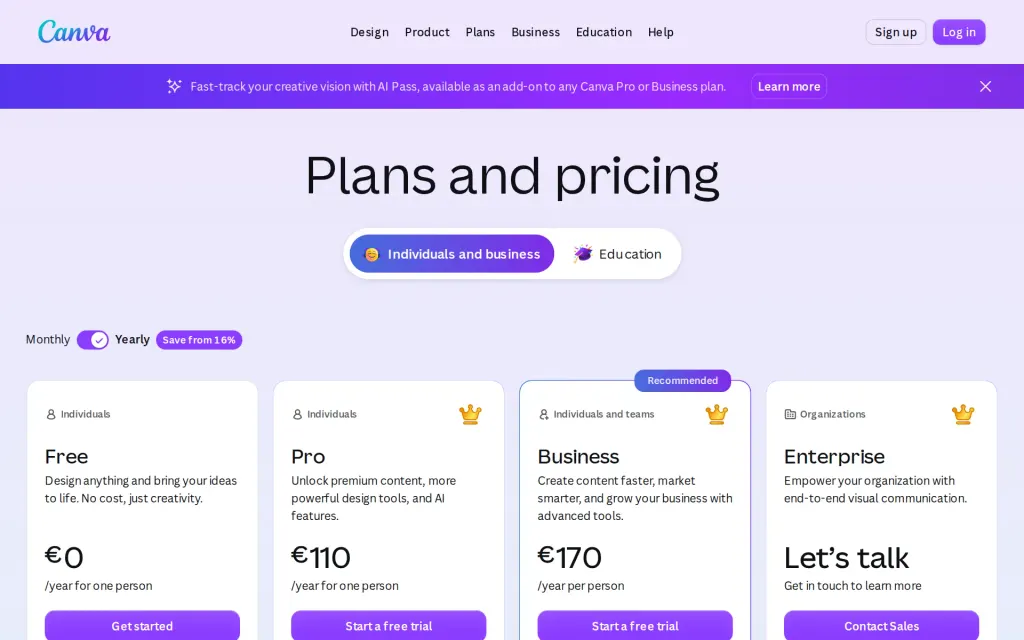
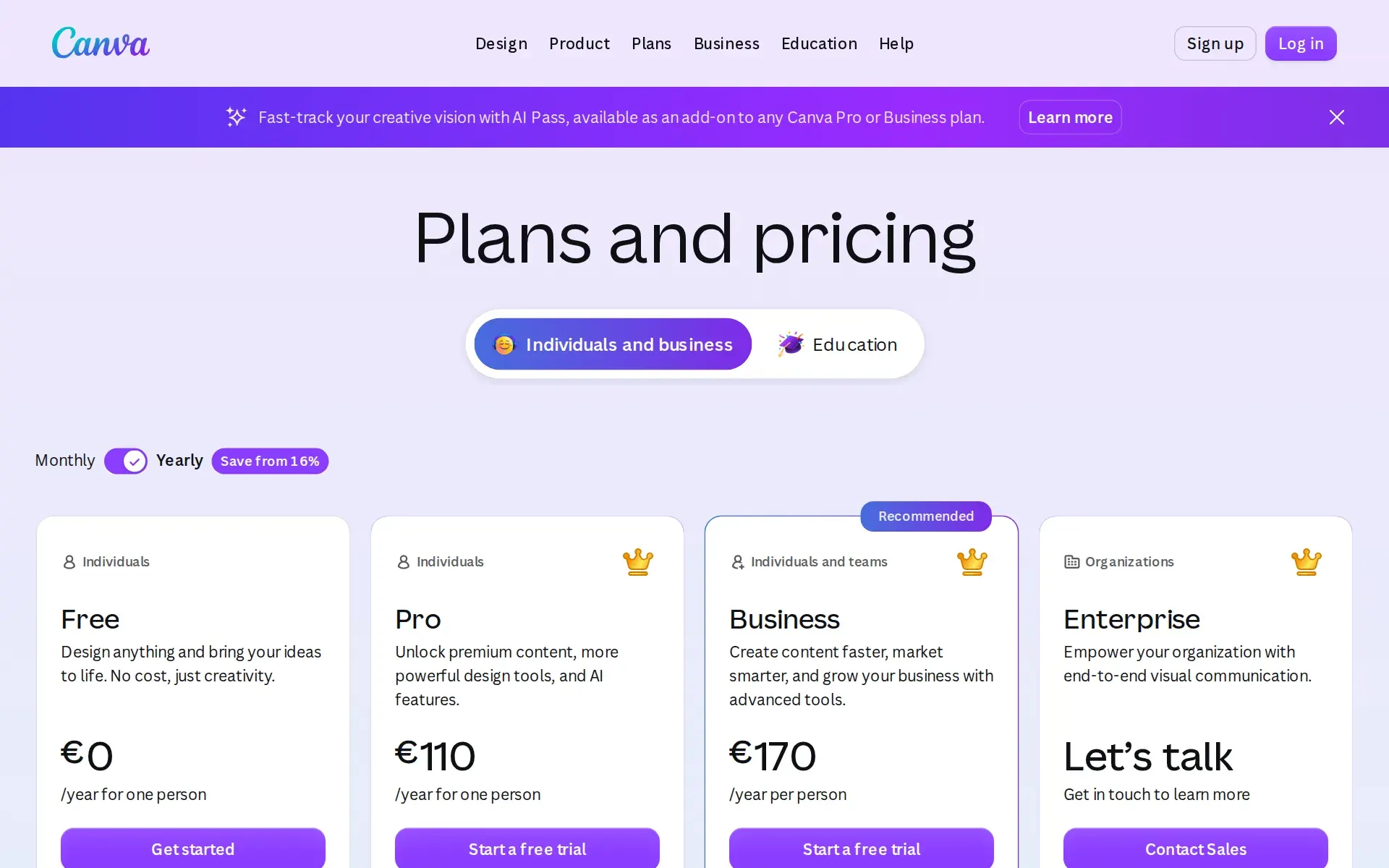
Pricing page, canva.com, captured
Filed under
Sources and updates
Sources on canva.dev6
Updates1
- Free tier · What it does
Is this yours? Claim it free and edit it in your dashboard, or feature it in Design Agents.