
At a glance
- Categories
- Design AgentsAI Images for Marketing
- Tags
- Freemium, Free Trial
What is Recraft?
Recraft is an AI image generation and editing workspace for designers and marketers that creates visuals, vectors, and mockups from prompts. It combines exceptional prompt understanding, unmatched vector generation, and AI editing tools with integrations for Figma, Framer, Discord, and Chrome. Teams at The Times, Ogilvy, HubSpot, Netflix, Asana, Airbus, and Microsoft use it. Plans run Free $0, Basic $10/month, Pro $16/month, and Teams $18/month per seat.
Recraft sells its own image models and the studio around them
Recraft is two things sold together. The first is a browser canvas, Recraft Studio, where you generate and edit raster images, editable SVG vectors, mockups and video, create color palettes, inpaint and outpaint inside frames, and build reusable custom styles from reference images. The second is the model line underneath it: Recraft V2 through V4.1, including Flash, Pro, Utility and vector variants, which the vendor trains and serves itself.
Studio also runs external models. The Basic plan description lists Nano Banana, Seedream, GPT Image, Flux and others for images, and the Pro plan adds video models including Kling, Veo and Seedance. So a subscription buys both the house models and a front end onto other vendors' models, metered from the same credit balance.
Vector output is the part that is hard to find elsewhere. The export dialog writes PNG, JPG, TIFF, PDF, SVG and Lottie, and generated vectors arrive as editable SVG layers rather than traced raster.
Credits, not generations, are the unit that matters
Every plan is an allowance of credits that resets monthly and does not roll over. Basic is 1,000 credits, Pro and Teams start at 2,000 with 4,000, 8,000 and 16,000 steps, and Teams counts the allowance per seat. Credit cost per action is not fixed: the pricing FAQ says only that "Credit costs vary depending on the type of action and the model used", with external model pricing listed separately.
That makes chat the expensive surface. Agentic mode charges credits for each exchange with the language model on top of the image cost, and the vendor's advice is to start a new session when switching tasks because accumulated context costs more. The Design Agent, which builds a full kit of about twelve assets, says plainly that "a full project can add up".
Top-up packs come in 200, 400, 800 and 1,600 credits, never expire, and are used automatically once the monthly allowance is gone. They are not available on Free. On Teams the top-up pool is shared across seats while each seat's monthly allowance is its own.
The API and the MCP server bill from different wallets
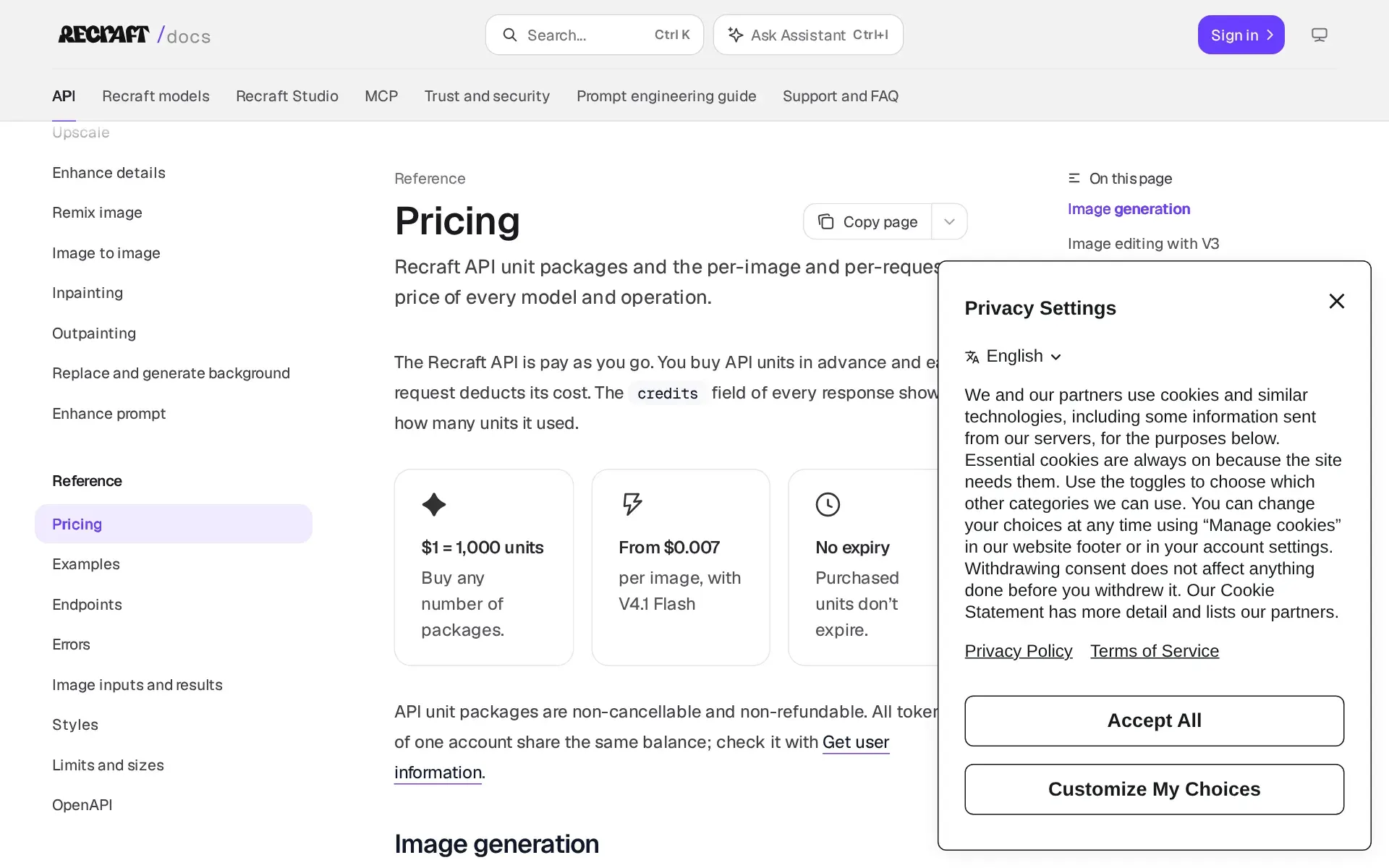
The REST API is prepaid and pay as you go: one dollar buys 1,000 API units, units do not expire, and every response reports what it consumed. Published prices run from $0.007 per image on V4.1 Flash to $0.30 for a Pro vector, with editing operations from $0.002 for erasing a region to $0.25 for a creative upscale. The surface covers generation, image to image, inpainting, outpainting, background replace and remove, vectorize, upscale and prompt enhancement, with an OpenAPI description and OpenAI-client compatibility.
The hosted MCP server at mcp.recraft.ai is a separate path with nine tools, OAuth sign-in and no local install, usable from any client that speaks Streamable HTTP. Its billing is the catch worth knowing: MCP calls deduct from subscription credits, not API units, so an "Insufficient credits" error from Claude or Cursor is fixed in the web account rather than by buying units.
API units are non-cancellable and non-refundable, and API generation results are deleted within 24 hours.
Training on your content depends on which plan you are on
Recraft trains its own models on user content by default. The data use page says images, prompts and chat content may be included, that free and paid accounts are included by default, and that Teams are not. The opt-out is a toggle called "Help improve Recraft" in profile settings, and the same page states it "is not available on the Free plan". API inputs and outputs are never used for training.
Two pages read as if they disagree. The compliance FAQ answers the question "Does Recraft use my data to train AI models?" with "No. Generated or uploaded assets are not used to train external models." That answer is about external providers, and the privacy policy backs it up: external image and video providers "operate under zero data retention or equivalent contractual terms". Read alone, the FAQ overstates the position on Recraft's own models.
Free output carries a second cost. Images made on the Free plan are owned by Recraft, appear in the public community gallery, and are not generally removed on request outside legal obligations.
Enterprise claims land unevenly against the documentation
The published audits are real and named: SOC 2 Type 2 and AIUC-1, both with linked announcements, plus GDPR alignment and PCI DSS Level 1 through Stripe and Google Pay. The security page adds role-based access, annual penetration testing, daily encrypted backups and a disaster recovery target of 24 hours. No ISO 27001 or ISO 42001 certificate and no data processing agreement document are published.
Two governance claims are thinner than the enterprise page suggests. That page lists "audit logs" among enterprise controls and promises "SLA-backed stability", yet the Teams admin documentation describes only seats, two roles, billing and a delete-workspace action, and no uptime figure or service level document appears anywhere on the site. Single sign-on is concrete by contrast: it is a listed Teams plan feature, so individual Basic and Pro subscribers do not get it.
Data location is undisclosed. The privacy policy says information is processed in the United States and other countries where providers operate, and names transfer safeguards rather than a region a customer can choose.
Who it fits, and who should look elsewhere
Recraft is strongest for designers and marketing teams who need many on-brand assets, especially vector work: logos, icons, illustration and typography-bearing layouts, with custom styles built from reference images and reused across a kit. The plugins keep that work where it already happens, in Figma, Framer, Google Docs, Google Slides and a Chrome side panel, all drawing on one credit balance. Developers get a cheap per-image API and an MCP server that needs no hosting.
It fits badly in three cases. Anyone who needs commercial rights cannot use the free tier at all, since Free output is public and owned by Recraft. Teams with a fixed monthly budget will find credit consumption hard to forecast, because chat and agent sessions spend credits per exchange and no Studio calculator is published. Buyers with a data residency requirement, a self-hosting requirement or a need for a signed service level agreement will find none of the three stated.
Recraft, Inc. is based in San Francisco with a UK subsidiary, Recraft AI Limited, and its about page claims more than 3 million users and 350 million images generated, a vendor figure with no independent source attached.
How much does Recraft cost?
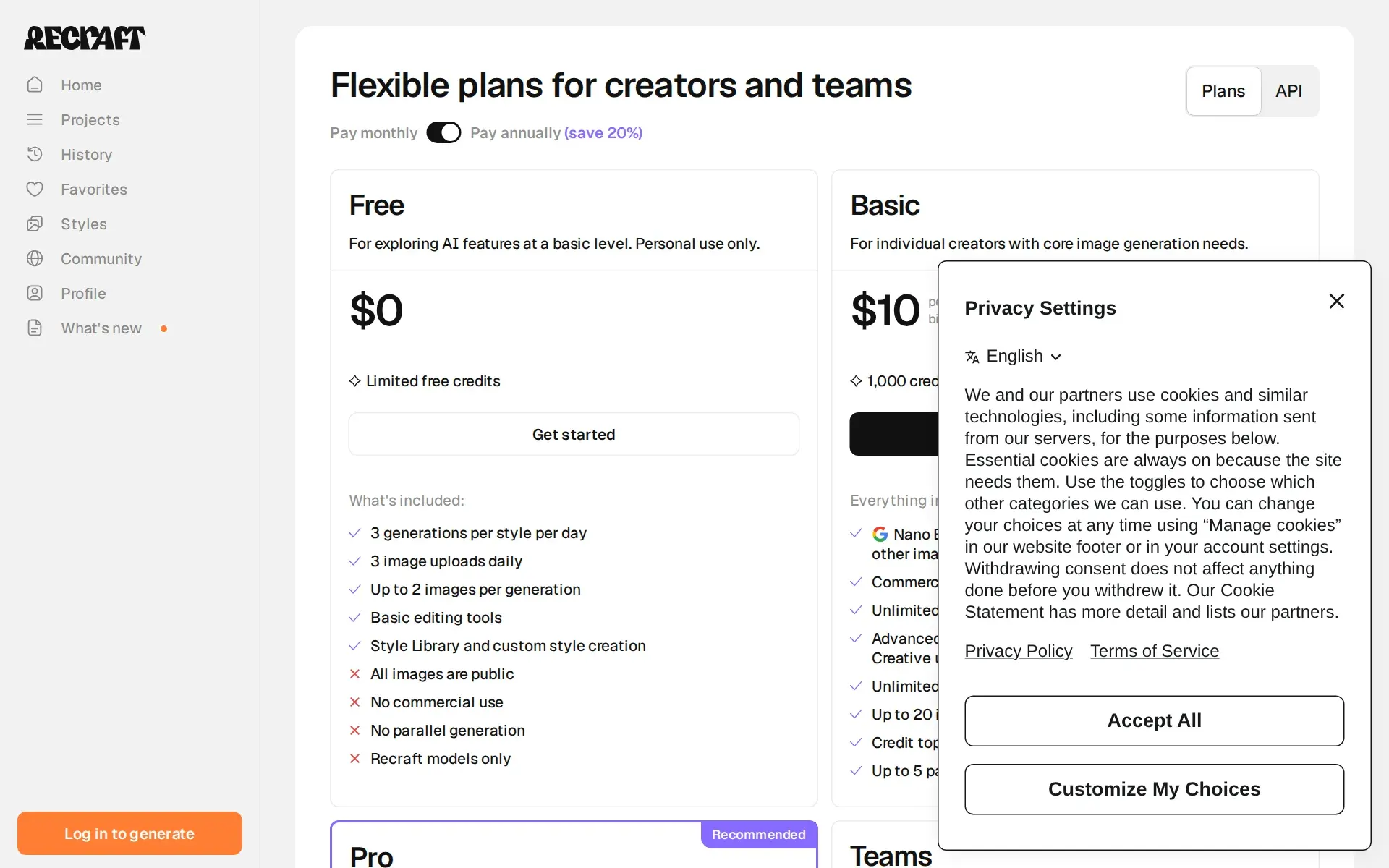
Free
Free
- 3 generations per style per day
- 3 image uploads daily
- Up to 2 images per generation
- Basic editing tools
- Style Library and custom style creation
- All images are public
- No commercial use
- No parallel generation
- Recraft models only
Basic
$10/mo
- Commercial rights and private generations
- Unlimited image uploads
- Tools: Custom color palettes, Magic wand, Creative upscale, Artistic level, Extract prompt
- Unlimited styles usage
- Up to 4 images per generation
- Credit top-ups
- Up to 5 parallel generations
Pro
$16/mo
- Video generation NEW
- Full access to all video generation controls
- Priority generation for images
- Up to 10 parallel generations for video
Teams
$18/mo/seat
- Shared custom styles
- Centralized account management
- Centralized billing
- 24/7 support
- Single Sign-On (SSO)
Price and terms
- Card to start
- YesNot required
- Sign up without sales
- YesYes
What needs a higher plan
- Teams
- Single sign-on
- Enterprise
- Audit log, Uptime promise
From recraft.ai/pricing, checked .
The AgentsIndex digest
Price changes and new tools like Recraft, at most once a week.
Last issue: ChatGPT vs Claude: Which One Should You Use? · 13 October 2026
Works with
- YesDiscord
- YesFigma
- YesFramer
- YesGoogle Docs
- YesChrome
For AI agents
- MCP server
- Yes
- API
- Yes
The facts, with their sources
What it costs to start
- What the price counts
- YesStudio sells per-month subscriptions that carry a credit allowance, with Teams priced per seat, while the API is prepaid pay-as-you-go at one dollar for a thousand units.
The Recraft API is pay as you go. You buy API units in advance and each request deducts its cost.
recraft.ai/docs/api-reference/pricing - Free tier
- YesA standing Free plan costs nothing and gives limited credits, but caps uploads and generations and publishes everything you make to the community gallery.
Free For exploring AI features at a basic level. Personal use only. $0 Limited free credits
recraft.ai/pricing - Self-serve signup
- YesEvery paid tier can be bought from the pricing page through Stripe checkout, with Contact sales offered only as an alternative route on Teams.
Recraft accepts credit cards, debit cards, and bank transfers. Payments are processed securely via Stripe.
recraft.ai/pricing - Card to start
- NoThe Free plan is described as usable without a subscription, and account creation runs on passwordless email codes or Google, Discord and Apple logins rather than payment details.
The Free plan is ideal for trying out Recraft's core functionality without a subscription.
recraft.ai/docs/plans-and-billing/free-… - Contract
- YesBoth monthly and annual billing are offered on every paid plan, so a buyer can stay month to month and pay the higher rate instead of committing a year.
Recraft offers paid subscriptions for individual creators and teams with both monthly and annual billing options (annual billing provides up to 20%…
recraft.ai/docs/plans-and-billing/paid-… - Cancel any time
- YesCancellation is self-service in the profile menu and takes effect at the end of the paid period, though refunds are discretionary and purchased API units are non-refundable.
You can cancel at any time: — Click your profile in the upper right and select “Manage subscription” — Click “Cancel plan” and confirm
recraft.ai/pricing
What it works with
- Works with
- YesNative plugins cover Figma and Framer, add-ons cover Google Docs and Slides, and a Chrome side panel works on any page, all drawing on the same account credits.
Recraft integrates directly into the tools you already use. Through native plugins and browser extensions, you can generate images, vectors, icons,…
recraft.ai/docs/recraft-plugins - Public API
- YesA documented REST API at external.api.recraft.ai covers generation, editing, vectorizing and upscaling, with bearer tokens, an OpenAPI description and prepaid units bought separately from subscription credits.
The base URL is https://external.api.recraft.ai/v1. The API follows REST principles, so any HTTP client works.
recraft.ai/docs/api-reference/getting-s… - MCP server
- YesA hosted remote MCP server at mcp.recraft.ai authenticates by OAuth and exposes nine tools for generation, styles, vectorizing, background work and upscaling, billed to subscription credits.
Recraft offers to use a remote MCP server at https://mcp.recraft.ai/mcp that requires no local installation. Authenticate via OAuth with your Recraft…
recraft.ai/docs/mcp-reference/getting-s…
What it does on its own
- Acts on its own
- PartlyThe Design Agent builds a set of roughly twelve matching assets from one brief, but it stops to offer four directions and to have the asset list confirmed before it runs.
Confirm which assets belong in the kit, and the Design Agent builds the full set, around 12 pieces
recraft.ai/docs/design-agent - No code needed
- YesStudio is a browser canvas driven by prompts and chat, and the agent is briefed in plain language with no commands to learn, so nothing needs code outside the API.
There’s no new commands to learn. You talk to the Design Agent the way you'd brief a collaborator, right in the chat.
recraft.ai/docs/design-agent
What happens to your data
- No training on your data
- PartlyPaid users can switch off training in profile settings and API traffic is never used, but the opt-out is explicitly unavailable on the Free plan where content is used by default.
Training opt-out is not available on the Free plan. On the Pro plan, you can choose to opt out in your Profile settings by turning off the “Help…
recraft.ai/docs/trust-and-security/data… - Retention you control
- PartlyAPI results are deleted within 24 hours and account deletion erases personal data, but Studio assets simply stay in the account with no configurable retention window, and Free-plan gallery images are not generally removed on request.
For API usage, generation results are deleted within 24 hours to minimize exposure.
recraft.ai/docs/trust-and-security/data… - Take your data out
- YesFinished work exports from the canvas in PNG, JPG, TIFF, PDF, SVG or Lottie at chosen dimensions, and vectors come out as editable SVG rather than flattened raster.
Specify your image dimensions, format (PNG, JPG, TIFF, PDF SVG, or Lottie) and resolution.
recraft.ai/docs/recraft-studio/exportin…
Whether a company can buy it
- Security audits
- YesSOC 2 Type 2 and AIUC-1 are both named as completed third-party audits, with GDPR alignment and PCI DSS handled through Stripe; no ISO 27001 or ISO 42001 certificate is claimed.
Recraft has completed a SOC 2 Type 2 certification, demonstrating that our systems are independently audited for security, availability, and…
recraft.ai/docs/trust-and-security/comp… - Single sign-on
- PartlySingle sign-on is listed as a Teams plan feature, so individual Basic and Pro subscribers cannot use it; consumer sign-in is passwordless email codes or Google, Discord and Apple.
The Teams plan includes: Shared custom styles Centralized account management Premium 24/7 support Single Sign-On (SSO)
recraft.ai/docs/plans-and-billing/paid-… - Audit log
- PartlyAudit logs are named among enterprise access controls on the enterprise page, but the Teams admin documentation covers only seats, roles and billing and describes no log a customer can read.
Role-based permissions, single sign-on, audit logs, and governance controls.
recraft.ai/enterprise - Uptime promise
- PartlyThe enterprise page promises SLA-backed stability for API workloads, and the security page states 24-hour disaster recovery, but no uptime percentage or written service level document is published.
High availability with predictable response times and SLA-backed stability for mission-critical workflows.
recraft.ai/enterprise
Frequently asked questions
- What is Recraft?
- Recraft is an AI image generation and editing workspace for designers and marketers that creates visuals, vectors, and mockups from prompts. It combines exceptional prompt understanding, unmatched vector generation, and AI editing tools with integrations for Figma, Framer, Discord, and Chrome. Teams at The Times, Ogilvy, HubSpot, Netflix, Asana, Airbus, and Microsoft use it. Plans run Free $0, Basic $10/month, Pro $16/month, and Teams $18/month per seat.
- How much does Recraft cost? Is it free?
- Recraft has a free plan, with paid tiers including Basic at $10per month, Pro at $16per month, Teams at $18per month per seat.
- What is Recraft used for? Who is it for?
- Recraft is used for exceptional prompt understanding, design assets with taste built in, and unmatched vector generation. It's built for Brand designers, Marketing teams, and Illustrators.
- Does Recraft have an API and what does it integrate with?
- Recraft doesn't publish a public API. It integrates with Discord, Figma, Framer, Google Docs, Chrome.
Screenshots
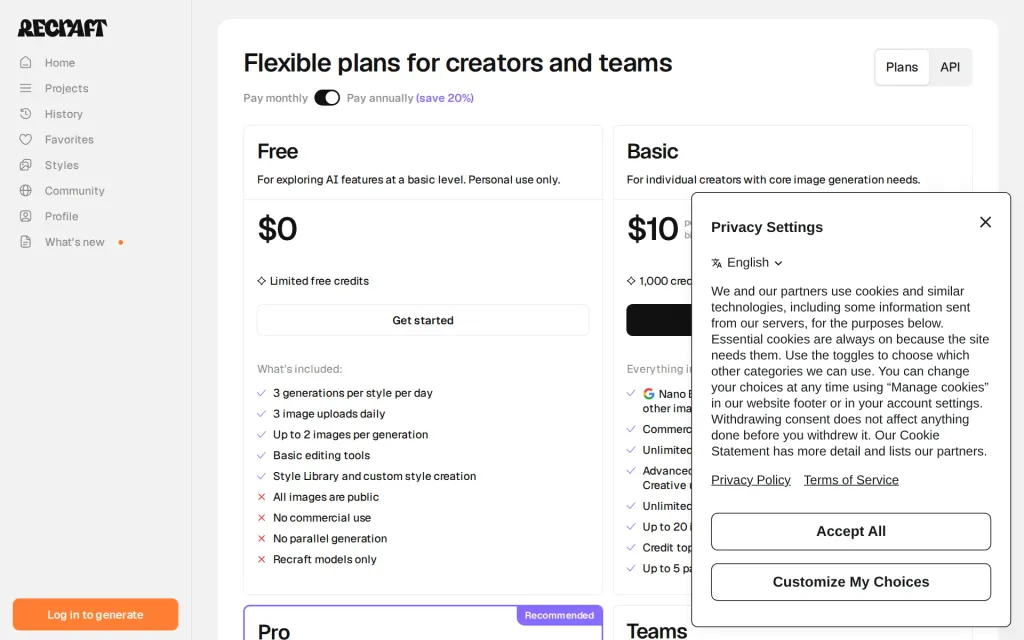
Pricing page, recraft.ai, captured 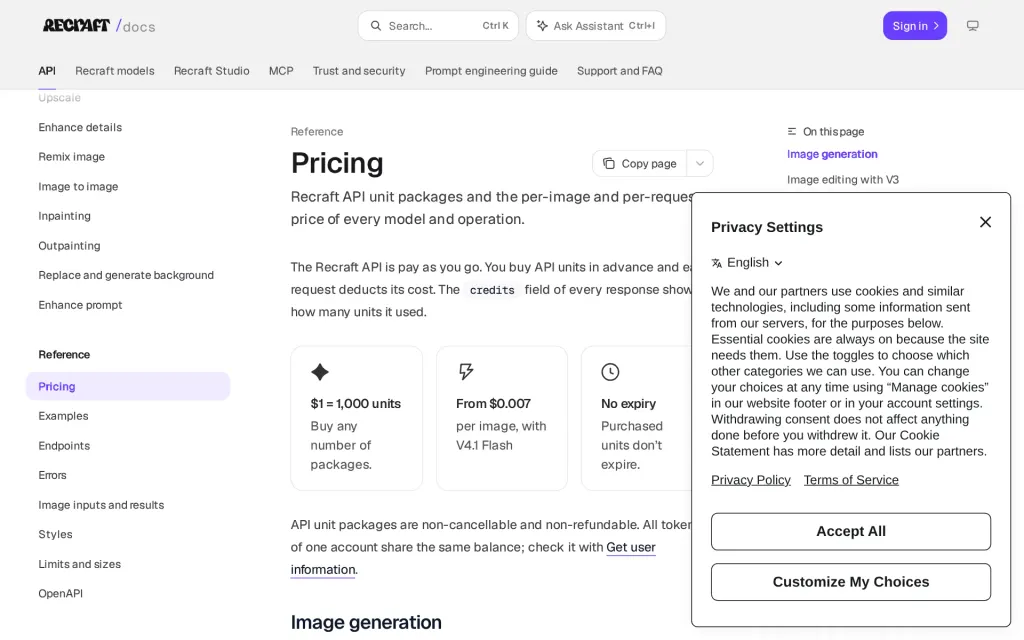
Docs, recraft.ai, captured
Filed under
Sources and updates
Last changed
Sources on recraft.ai13
- /pricing
- /docs/design-agent
- /docs/plans-and-billing/paid-plans
- /docs/trust-and-security/compliance-and-certifications
- /enterprise
- /docs/api-reference/getting-started
- /docs/api-reference/pricing
- /docs/mcp-reference/getting-started
- /docs/plans-and-billing/free-plan
- /docs/recraft-plugins
- /docs/recraft-studio/exporting-and-sharing/how-to-export-an-image
- /docs/trust-and-security/data-protection-and-privacy
- /docs/trust-and-security/data-use-and-model-training
Updates1
- Free tier · Price · What it does
Is this yours? Claim it free and edit it in your dashboard, or feature it in Design Agents.