
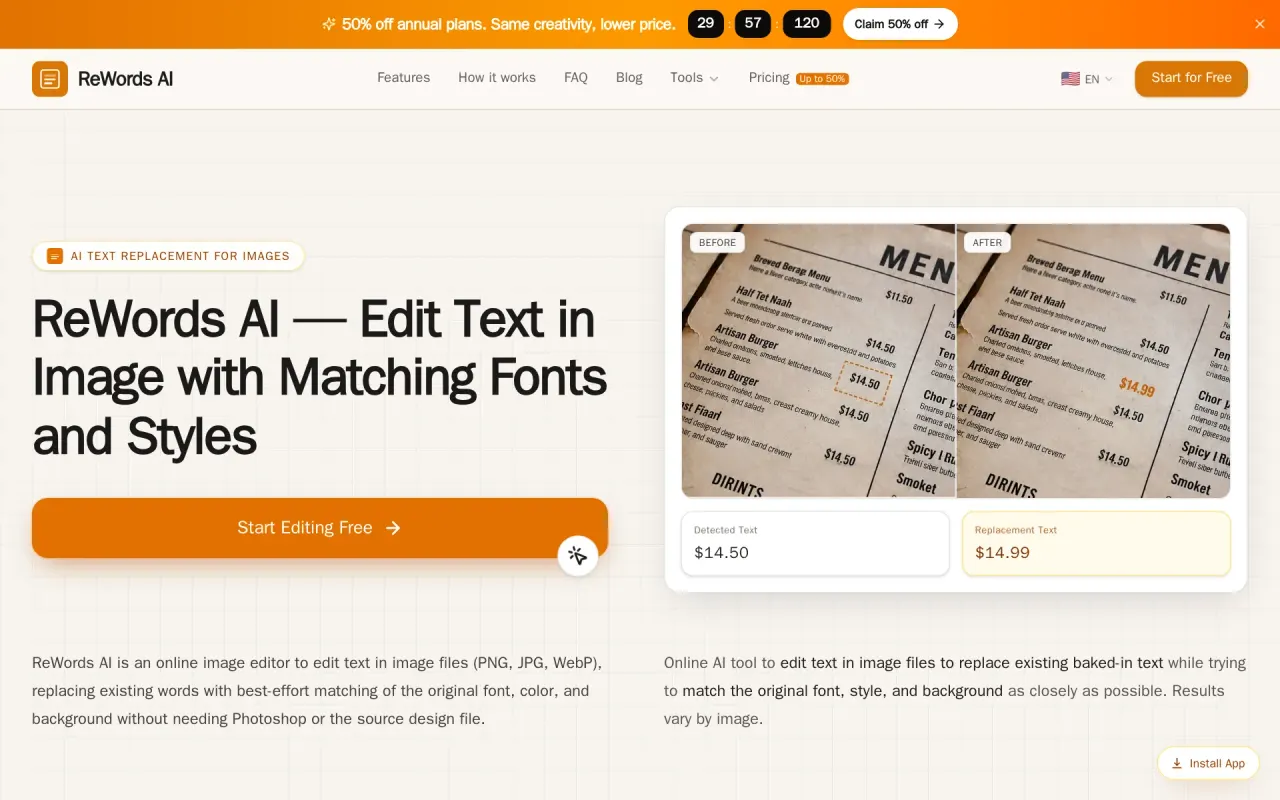
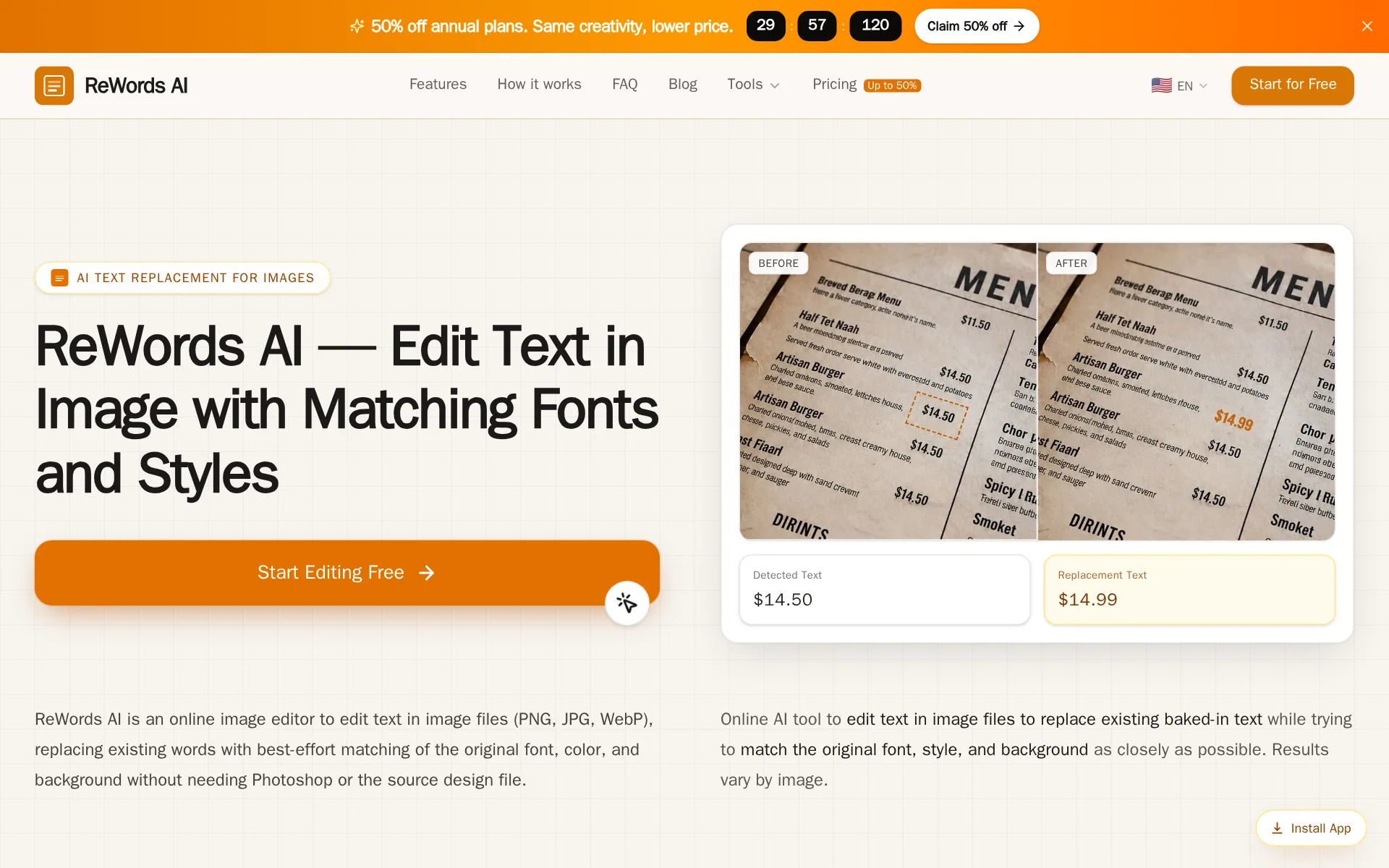
What is ReWords AI?
ReWords AI is an AI image text editor for marketers, creators, and teams that replaces or removes words already embedded in PNG, JPG, or WebP files. It detects text regions, matches the original font and style, and supports multiple text edits in one image. The product integrates with Adobe Photoshop, Canva, and Stripe. Pricing starts with a $5.99 100-credit pack, alongside Starter, Professional, and Advanced annual plans.
What does ReWords AI do?
ReWords AI handles finished-image text edits by detecting the words already inside a PNG, JPG, or WebP, then rebuilding the selected area so the replacement fits the surrounding font, color, and background. The workflow is simple: upload, select detected text or draw a missing box, type the new wording, and generate.
It can also remove text by leaving the replacement blank, and it supports multiple text regions in one image. The result is meant to look natural enough for screenshots, posters, product graphics, and AI-generated visuals, while still asking you to review spacing and style before publishing. Behind the scenes, the tool is tuned for short, clear text rather than heavy restoration work.
It supports images up to 8MB and uses credits based on output resolution, with 10 credits per standard 1K image. ReWords AI says it works on desktop and mobile, and its FAQ notes that uploaded images may be processed with third-party AI and storage providers. The product also points to integrations with Adobe Photoshop, Canva, and Stripe, and cites a free image edit for new users after signing in.
Why use ReWords AI?
- The selected-text workflow keeps the edit focused on the exact region instead of rebuilding the whole design.
- It can replace, correct, or remove text, so one tool covers swaps and cleanup jobs.
- Multiple text regions can be changed in one image, which helps with busy promo graphics and screenshots.
- A free image edit after signing in lowers the barrier to testing whether the output fits your image style.
Who is ReWords AI for?
- Marketers who need to update promo copy, prices, or headlines on finished assets.
- E-commerce teams who want to revise product labels or packaging text without source files.
- Social media creators who need to fix captions or swap text on templates quickly.
- Support or operations teams who need to correct screenshots and UI text for documentation.
What are ReWords AI's key features?
Edit Existing Text
Upload an image and replace existing words without source files; the workflow supports 1K, 2K, and 4K outputs for fast cleanup.
Match Original Font
Automatically matches font and style while replacing text, helping edits blend into the original design instead of looking pasted on.
AI text detection
Detects text regions automatically and supports replacing multiple text regions per image, reducing manual selection work on complex layouts.
style-aware replacement
Uses style-aware replacement to preserve the image's visual look while correcting or removing words, which matters for marketing and product graphics.
Download generated results directly
Exports finished edits directly after processing, so teams can move from upload to delivery in four simple steps.
API for Developers?
Provides an Edit Text in Image API in beta, with access details via support, enabling programmatic image-text replacement workflows.
Replace, correct, or remove words
Handles replacement, correction, and text removal in one tool, with a free image edit and 8MB max upload size for quick testing.
Adobe Photoshop
Works alongside Adobe Photoshop for designers who want AI text replacement without rebuilding the entire image manually.
What are ReWords AI's use cases?
Marketers refresh promo assets
Marketers use ReWords AI to update finished campaign images when prices, headlines, or offer text change, using Edit Existing Text and Match Original Font to keep the asset looking native. They can replace multiple text regions at once and download generated results directly for faster launch updates.
E-commerce label fixes
E-commerce teams use ReWords AI to revise product labels or packaging text without source files, using AI text detection and style-aware replacement to swap wording cleanly. No source files needed helps them correct packaging mockups or listing images without reopening design projects.
Creators swap caption text
Social media creators use ReWords AI to fix captions or swap text on templates quickly, relying on Replace, correct, or remove words and Automatic font and style matching to preserve the original look. They can export polished results directly instead of rebuilding the post from scratch.
Ops teams clean screenshots
Support or operations teams use ReWords AI to correct screenshots and UI text for documentation, using Remove text and Edit Existing Text to update outdated labels or redact mistakes. This helps them publish clearer help articles and internal guides without recreating every screen.
How does ReWords AI work?
- Upload your image to start the edit, keeping the original asset intact while ReWords AI prepares it for text changes.
- Select the text area with AI text detection, or draw the missing box when you need to target a specific word region.
- Replace all text using style-aware replacement and Match Original Font so the new wording blends into the design naturally.
- Review the result, then Download generated results directly for publishing, sharing, or passing into Adobe Photoshop or Canva workflows.
How much does ReWords AI cost?
Starter
$5.00$10.00/mo
- For individuals who edit images occasionally
- Summer · up to 50% off
- $59.99 billed annually; credits are issued monthly in 12 grants
- ≈240 images · ~$0.25 / image
- Save $59.99 versus monthly
- Subscribe Now
- Credits / month
- 2002400 credits per year
- Per standard 1K image$0.25
- HD 2K · 20 credits
- Ultra HD 4K · 30 credits
- Replace multiple text regions per image
- AI text detection and style-aware replacement
- Download generated results directly
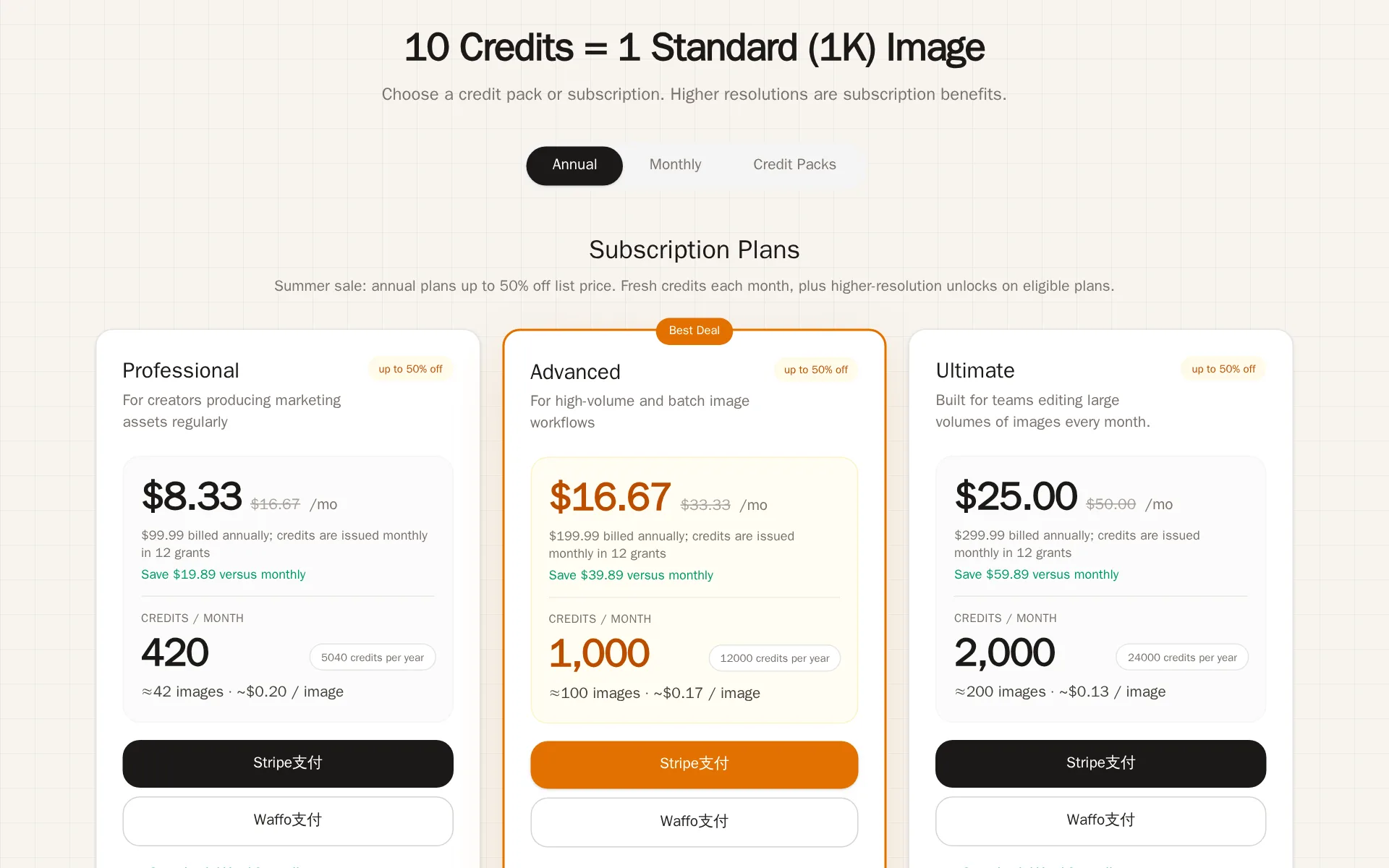
Professional
$8.33$16.67/mo
- For creators producing marketing assets regularly
- Summer · up to 50% off
- $99.99 billed annually; credits are issued monthly in 12 grants
- ≈504 images · ~$0.20 / image
- Save $99.99 versus monthly
- Subscribe Now
- Credits / month
- 4205040 credits per year
- Per standard 1K image$0.20
- HD 2K · 20 credits
- Ultra HD 4K · 30 credits
- Replace multiple text regions per image
- AI text detection and style-aware replacement
- Download generated results directly
Advanced
$16.67$33.33/mo
- For high-volume and batch image workflows
- Summer · up to 50% off
- $199.99 billed annually; credits are issued monthly in 12 grants
- ≈1200 images · ~$0.17 / image
- Save $199.99 versus monthly
- Subscribe Now
- Credits / month
- Per standard 1K image$0.17
- HD 2K · 20 credits
- Ultra HD 4K · 30 credits
- Replace multiple text regions per image
- AI text detection and style-aware replacement
- Download generated results directly
100-credit pack
$5.99/pack
- One-time purchase with no subscription
- ≈10 images · ~$0.60 / image
- Credits
- 100Credits never expire
- Per standard 1K image$0.60
- Standard 1K · 10 credits
- Replace multiple text regions per image
- AI text detection and style-aware replacement
- Download generated results directly
- HD 2K not included
200-credit pack
$9.99$13.99/pack
- Most Popular
- One-time purchase with no subscription
- ≈20 images · ~$0.50 / image
- Credits
- 200Credits never expire
- Per standard 1K image$0.50
- Standard 1K · 10 credits
- Replace multiple text regions per image
- AI text detection and style-aware replacement
- Download generated results directly
- HD 2K not included
500-credit pack
$19.99$29.99/pack
- One-time purchase with no subscription
- ≈50 images · ~$0.40 / image
- Credits
- 500Credits never expire
- Per standard 1K image$0.40
- Standard 1K · 10 credits
- Replace multiple text regions per image
- AI text detection and style-aware replacement
- Download generated results directly
- HD 2K not included
From rewordsai.app/pricing, checked .
What does ReWords AI integrate with?
- YesStripe
- YesAdobe Photoshop
 Canva
Canva
Frequently asked questions
- What is ReWords AI?
- ReWords AI is an AI image text editor for marketers, creators, and teams that replaces or removes words already embedded in PNG, JPG, or WebP files. It detects text regions, matches the original font and style, and supports multiple text edits in one image. The product integrates with Adobe Photoshop, Canva, and Stripe. Pricing starts with a $5.99 100-credit pack, alongside Starter, Professional, and Advanced annual plans.
- What is ReWords AI used for? Who is it for?
- ReWords AI is used for Edit Existing Text, Match Original Font, and AI text detection. It's built for Marketers, E-commerce teams, and Social media creators.
- Does ReWords AI have an API and what does it integrate with?
- The Edit Text in Image API is currently in beta and access details are available by contacting support. It integrates with Stripe, Adobe Photoshop, Canva.
Screenshots
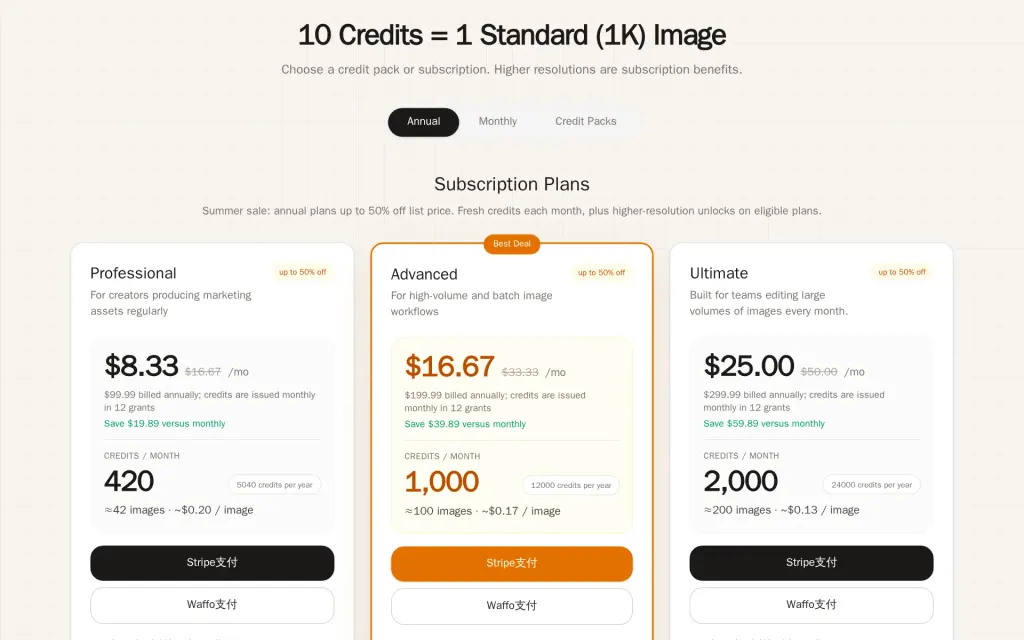
Pricing page, rewordsai.app, captured
Sources
Based on ReWords AI's own pages, not a hands-on trial. Checked against rewordsai.app on .
Filed under
Is this yours? AI assistants like ChatGPT, Claude and Perplexity opened AgentsIndex pages 807 times from 17 October to 25 October. Claim it free and edit it in your dashboard, or feature it in Design Agents.