
What is Runway?
Runway is an AI video creation platform for creative teams that combines generation, editing, and transformation in one interface. It supports prompts, text, images, and existing footage, with Runway Agent, Gen-4.5, Aleph, Act-Two, Visual Effects, and Build the Workflows for repeatable production. It's used by Amazon, UCLA, and NVIDIA. Plans run Free $0, Standard $12/year, Pro $28/year, Unlimited $76/year, and Enterprise custom.
Runway sells one model stack through three front doors
Runway AI, Inc. describes itself as "building foundational Real-World Intelligence that can understand, simulate and act in the world", and what a buyer actually purchases is access to generative media models. The same stack is sold three ways, and which door you pick changes the price, the controls and the contract.
The first is the web app and mobile apps, bought as Free, Standard, Pro and Max plans with a monthly credit allowance. The second is Runway Dev, a developer API with Node and Python SDKs, an OpenAPI reference and a go-live checklist, billed per use. The third is Runway MCP, a hosted MCP server that puts generation inside an assistant you already use.
Notably, the model list is not all Runway's own. The plan cards and the MCP page name Gen-4.5, Aleph 2.0 and Gen-4 Turbo beside Seedance 2.5, Kling 3.0, Veo 3.1, GPT Image 2 and Nano Banana Pro, and the API tab sells this as "Single vendor, unified billing across every model". Runway trains and serves its own models and resells others through the same meter.
The MCP server is the agent surface, and it is a Pro feature
The MCP server is real, documented and specific. It is listed in the ChatGPT app directory, and the FAQ names ChatGPT, Claude.ai, Claude Desktop, Grok Bot, Cursor and Replit as supported clients. Setup is three steps and the vendor is explicit that there is no developer work: asked whether an API key is required, the answer is "No. In ChatGPT, Grok Bot and Cursor, add the Runway plugin and sign in."
Two details matter more than the integration list. First, billing: "MCP uses your Runway credits, just like the Runway app", so an agent generating video is spending the same allowance as a person in the editor, with no separate budget or cap of its own. Second, entitlement. The marketing page offers MCP to anyone with "compatible agents", but the pricing table lists Runway MCP as a feature of Pro and Max only. It does not appear in the Standard or Free feature lists. A buyer reading the MCP page alone would reasonably expect a $15 plan to reach it.
The developer API has its own MCP guide for Cursor, Claude Code and Codex, which connects to a Runway Dev account rather than an app subscription. That is a separate path with separate billing.
Pricing defaults to the annual rate on arrival
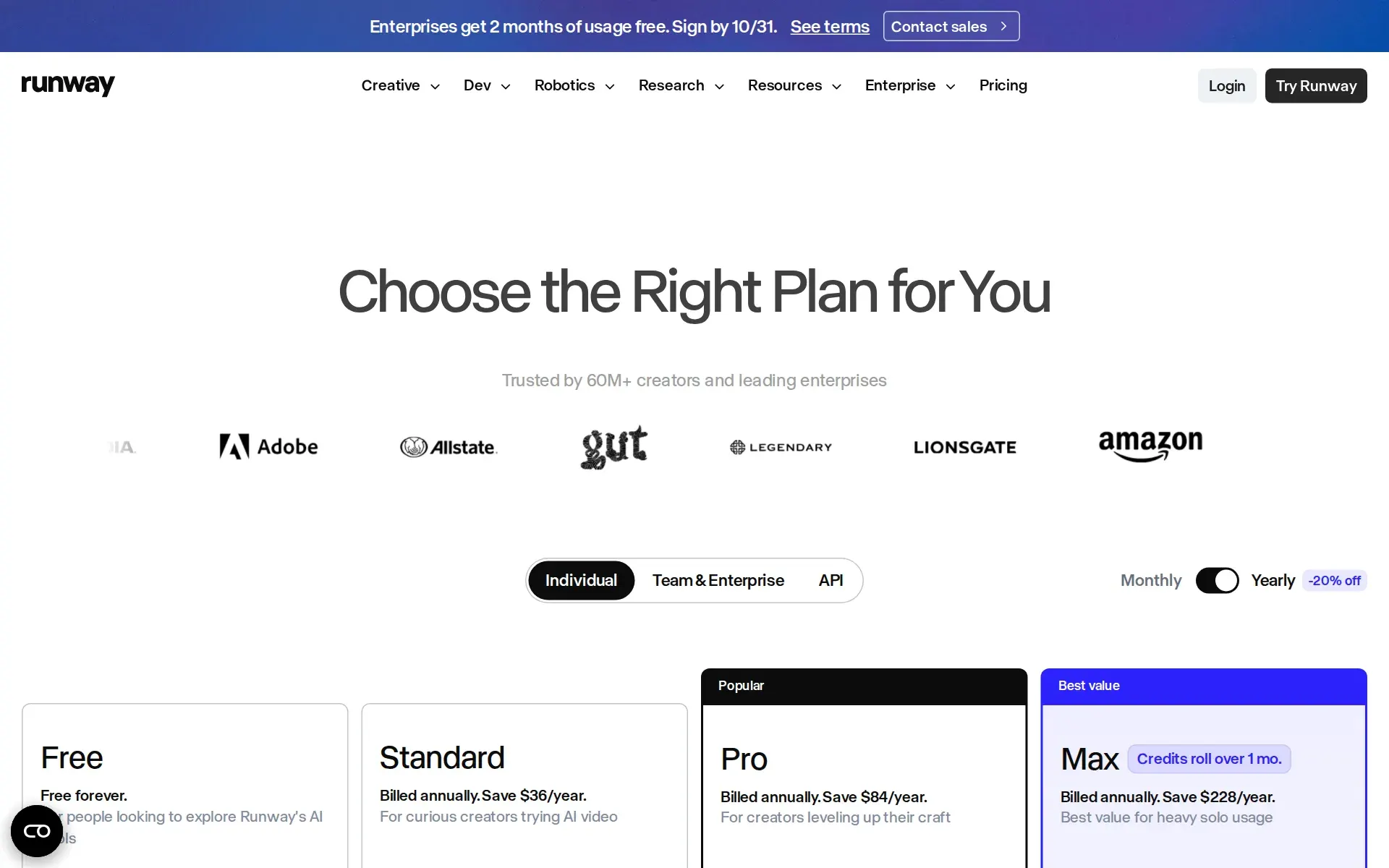
The pricing page opens with its Monthly/Yearly control already set to Yearly, with the switch reporting checked and a "-20% off" label beside it. Read without operating the toggle, Standard looks like a $12 product. Clicking Monthly shows the real month-to-month rate of $15, and the annual card carries "Billed annually. Save $36/year." Pro is $35 monthly and Max is $95 monthly, saving $84 and $228 a year respectively when paid up front.
Credits are the unit, and their worth moves with the model. Standard's 625 monthly credits are quoted as "52s of Gen-4.5, 104s of Gen-4 Turbo, or 78 Gen-4 Images (1080p)". Max's 9,500 credits buy 791 seconds of Gen-4.5 or 475 Nano Banana Pro images at 2K. Only Max and Team roll unused credits forward, and only for one month.
The Free plan deserves a careful read. It is labelled "Free forever" at $0 a month, but the grant is "125 one-time credits", not a monthly allowance. It is a standing account rather than a trial, and also a one-shot sample. Team is $69 per seat monthly or $55 billed annually, starts at two users and pools 165,600 credits a year across the workspace. Enterprise is quote-only.
The API is the one genuinely pay-as-you-go path: video from $0.05 per second, images from $0.01 and audio from $0.0025 per second, free to start and with no credit card asked for.
Training on your inputs is the default
Section 4.4 of the Terms of Use is the clause to read before uploading client material. Runway does not claim ownership of inputs or outputs, and states it "does not restrict your commercial use of your Outputs", which is unusually clear and applies from the Free plan up. The same clause then grants the company an "irrevocable, perpetual, worldwide, royalty-free" licence to use those inputs and outputs to "train and improve its AI models".
There is no settings toggle offered against this. "No training on your data" appears once on the site, as a row in the Enterprise column of the Team and Enterprise comparison, alongside "Support for zero-data retention" in the API tab's Enterprise card. For everyone on a self-serve plan, the published position is that submitted material may be used for model training.
The data security page states a "Technical separation between customer content storage and model training systems" and that "Customer content is never used for testing new features or changes". Neither sentence contradicts section 4.4; they describe isolation and test practice, not a training exclusion.
Certifications are real, the data agreement is not published
Security documentation here is better than most listings of this size. Runway publishes a dated security page, last updated August 2026, and names SOC 2 Type II with annual recertification and ISO/IEC 27001 issued by an accredited body, both requestable through a trust centre. It documents TLS 1.2+ in transit, AES-256 at rest, role-based access with enforced MFA, a private bug bounty programme, external penetration testing, a published subprocessor list and a public status page.
What is absent is the paperwork a procurement team asks for next. GDPR appears as "GDPR Readiness" and CCPA as "CCPA/CPRA Controls", which are statements of alignment rather than an offer to sign a data processing agreement. No DPA is published or named anywhere on the site. Legal indemnification and "Enterprise terms & MSA" are Team and Enterprise rows.
Data location is fixed. The privacy policy states that Runway is headquartered in the United States, may use vendors in other countries, and that using the service constitutes consent to transfer "in and to the United States and other applicable countries in which the privacy laws may not be as comprehensive". No region can be chosen. Retention is set by the vendor "for only as long as necessary", with face scans and voiceprints held no longer than three years from last interaction.
Who should look elsewhere
A team that needs its material kept out of model training cannot get that on a self-serve plan at any price. Standard, Pro and Max all sit under the same section 4.4 licence, and the exclusion is an Enterprise negotiation. The same is true of an uptime commitment, zero-data retention, single sign-on and admin roles: each is a Team or Enterprise row, so a small studio with compliance obligations is pushed into a sales conversation rather than a plan.
Anyone budgeting tightly should model the credit maths before subscribing. Because a credit buys different amounts of output depending on model and resolution, and because MCP and the editor draw on the same pool, a month of experimentation can exhaust an allowance with no published calculator to predict it. Top-ups are available from Pro upward, which makes overspend easy and forecasting harder.
Buyers expecting the MCP server at the entry price should check the plan table rather than the MCP page. And a team hoping to self-host, or to inspect the models, will find neither: the Terms forbid reverse engineering the service, and nothing on the site discusses customer-run deployment in either direction.
How much does Runway cost?
Free
Free
- Generative Video
- Generative Image
- Gemini 2.5
- Image Apps
- Generative Audio
- Text to Speech
- Audio Apps
- 3 video editor projects
- 5GB asset storage
- No Gen-4 Video
- Includes 125 credits (one time)
Standard
$12 a year
- Everything in Free and.
- Access to all Apps
- Ability to run Workflows
- Generative Video
- Aleph (Video Editing)
- Gen-4 (Image to Video)
- Act-Two (Performance Capture)
- Veo 3
- Video Apps
- Access to all third party image models (BFL FLUX.2 [max], Seedream 5.0 and more)
- Upscale resolution
- All video models
- Remove watermarks
- All video models
- Credits refresh monthly
- No rate restrictions
- Buy more credits
- 100GB asset storage
- Unlimited video editor projects
- Technical support via Runway dashboard
Pro
$28 a year
- Everything in Standard and.
- Create Custom Voices for Lip Sync and Text to Speech
- 500GB asset storage
Unlimited
$76 a year
- Everything in Pro and.
- Explore Mode
Enterprise
Contact Us
- Scalable for large organizations
- Includes all Pro Plan features, plus:
- Single sign-on
- Custom credit amounts
- Configurable organization and team spaces to organize users and assets
- Security and compliance
- Enterprise-wide onboarding
- Ongoing success program
- Priority support
- Integration with internal tools
- Workspace Analytics
Price and terms
- Card to start
- YesNot required
- Sign up without sales
- YesYes
What needs a higher plan
- Pro
- MCP server
- Team
- Limits on what it may do, Single sign-on
- Enterprise
- No training on your data, Retention you control, Uptime promise
From runwayml.com/pricing, checked .
The AgentsIndex digest
Price changes and new tools like Runway, at most once a week.
Last issue: ChatGPT vs Claude: Which One Should You Use? · 13 October 2026
Works with
- YesAmazon
- YesHistory Channel
- YesUnder Armour
- YesLionsgate
- YesTribeca Festival
For AI agents
- MCP server
- PartlyPro
- API
- Yes
The facts, with their sources
What it costs to start
- What the price counts
- YesThree meters run side by side: a flat monthly fee that buys a credit allowance on individual plans, a per-seat monthly fee on Team, and true pay-as-you-go per second or per image on the developer API.
625 credits monthly = 52s of Gen-4.5, 104s of Gen-4 Turbo, or 78 Gen-4 Images (1080p).
runway.com/pricing - Free tier
- YesA standing $0 plan exists and the vendor calls it free forever, but the credit grant is one time rather than monthly, so sustained use requires paying.
Free forever. For people looking to explore Runway's AI Tools $0 /month 125 credits 125 one-time credits to explore Runway's AI tools.
runway.com/pricing - Self-serve signup
- YesIndividual plans are bought directly from the pricing page and the developer API begins without a sales call; only Team at scale and Enterprise route through Contact Sales.
Get started free, no credit card required
runway.com/pricing - Card to start
- NoThe developer API states plainly that no credit card is needed to begin, and the Free web plan is entered through a Start Free button rather than a checkout.runway.com/pricing
- Contract
- PartlyIndividual plans can be bought month to month, but the advertised headline rates are the annual ones, every subscription auto-renews for an equal period, and Team starts at two seats.
After your initial subscription period, and again after any subsequent subscription period, your subscription will automatically commence on the…
runway.com/terms-of-use - Cancel any time
- PartlyYou cancel yourself from the Plans and Billing page with no exit fee, but the vendor keeps the remainder of the paid period and states that fees are non-refundable with no prorated refund.
You may cancel or change your subscription by logging into your Account and going to the "Plans & Billing" page. If you cancel your subscription, you…
runway.com/terms-of-use
What it works with
- Works with
- YesThe MCP FAQ names the assistants and editors it connects to by product, and the connection is account-level rather than gated per integration once the plan includes MCP.
You can use Runway MCP in ChatGPT, Claude.ai, Claude Desktop, Grok Bot, Cursor, Replit and other apps that support MCP (Model Context Protocol).
runway.com/mcp - Public API
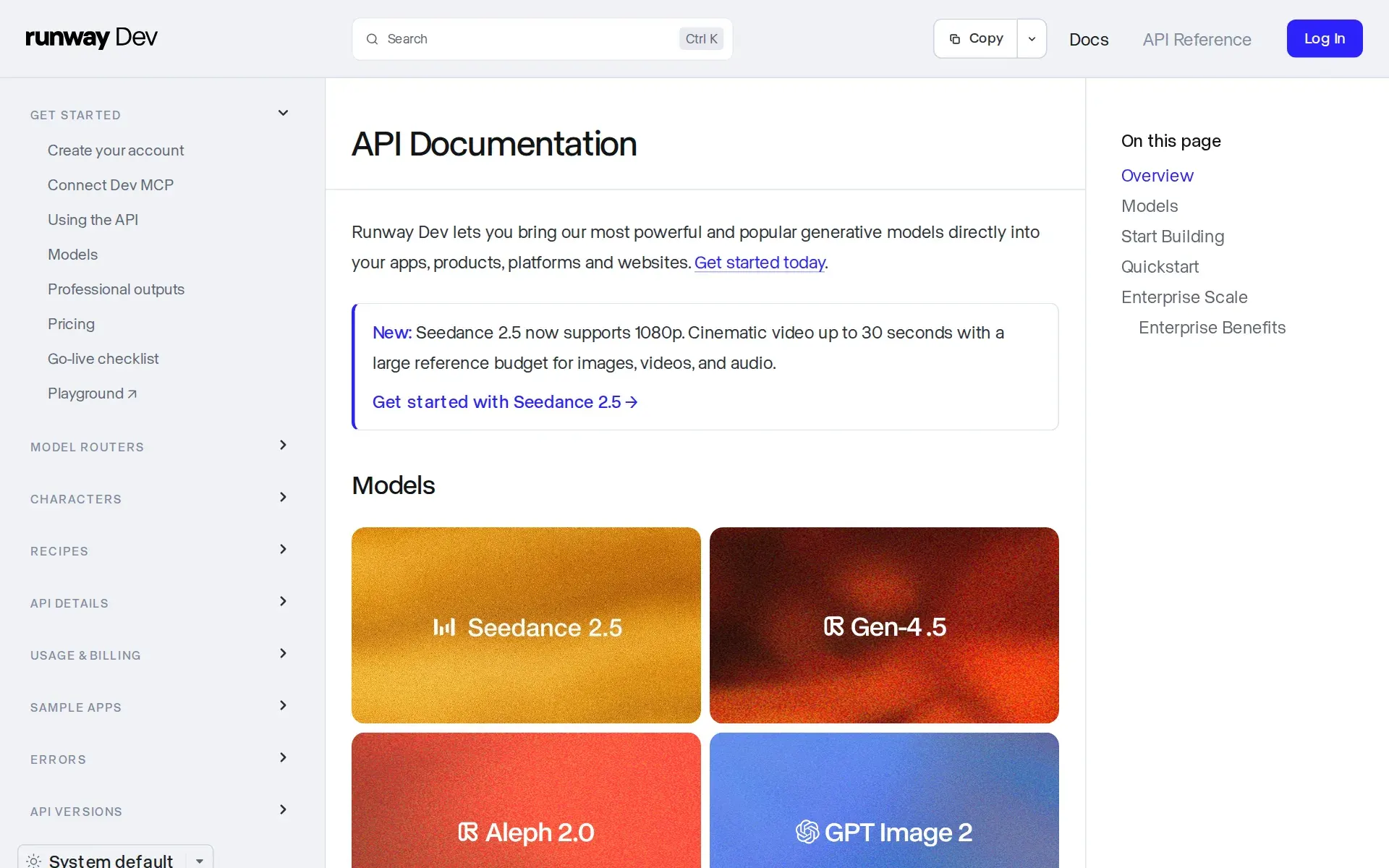
- YesA public developer API is documented with an OpenAPI reference, Node and Python SDKs and a go-live checklist, and it is sold as its own pay-as-you-go product line alongside the web plans.
Runway Dev lets you bring our most powerful and popular generative models directly into your apps, products, platforms and websites.
docs.dev.runwayml.com - MCP server
- PartlyA real hosted MCP server exists and needs no API key, but the pricing table lists Runway MCP only as a Pro and Max feature, so Standard and Free subscribers do not get it.
Generate high-quality images and videos right from where you're already working. Use Runway in ChatGPT, Claude, Grok Bot, Cursor and other compatible…
runway.com/mcp
What it does on its own
- Acts on its own
- YesThe vendor describes one prompt producing a finished multi-shot commercial, with the system choosing scenes, continuity and even the model, rather than a person approving each generation step.
Drop in a photo, describe the spot and Runway shoots every scene in the same kitchen and the same light. One prompt, one finished commercial.
runway.com/mcp - Limits on what it may do
- PartlyGovernance controls over what the system may do exist but sit on the paid team tiers: roles, sharing policies and third-party model configuration are Team and Enterprise rows, not individual plan features.
User roles & permissions Sharing policies Custom SSO 3P model configuration Tiered-admin management
runway.com/pricing - No code needed
- YesThe main route in is a web app and a chat plugin driven by plain prompts, and the vendor states explicitly that connecting an assistant needs no API key or developer setup.
No. In ChatGPT, Grok Bot and Cursor, add the Runway plugin and sign in. In other agents, add the Runway MCP URL to your agent settings, then sign in…
runway.com/mcp
What happens to your data
- No training on your data
- PartlyThe default is the opposite: the Terms grant Runway a license to train on your inputs and outputs, and no training on your data appears only as an Enterprise plan row.
You acknowledge that Inputs and Outputs may be used by the Company to train and improve its AI models, algorithms and related technology, products…
runway.com/terms-of-use - Retention you control
- PartlyRetention is set by the vendor for self-serve users, who can only delete an account or file a privacy request; a zero-data-retention option is published as an Enterprise commitment.
Support for zero-data retention
runway.com/pricing - Data stays in your region
- NoThe privacy policy states that using the service means consenting to processing and transfer in the United States and other countries where vendors operate, and offers no region to select.
We are headquartered in the United States and may use vendors or service providers that operate in other countries. By using the Service, or…
runway.com/privacy-policy - Open source
- NoThe Terms reserve all rights in the Services to the company and forbid decompiling or reverse engineering any part of them; the public GitHub repository holds agent skills and examples, not the models.
you shall not modify, translate, adapt, merge, make derivative works of, disassemble, decompile, reverse compile or reverse engineer any part of the…
runway.com/terms-of-use - Take your data out
- PartlyA right to data portability and account deletion are published for personal information, but the Terms disclaim any obligation to store your content and no bulk asset export is documented.
Right to data portability; and Right to information about financial incentives that we offer to you, if any
runway.com/privacy-policy
Whether a company can buy it
- Security audits
- YesTwo independent certifications are named and dated as maintained: SOC 2 Type II with annual recertification, and ISO/IEC 27001 issued by an accredited body, both requestable through a trust center.
Runway maintains SOC 2 Type II certification, validating our security controls through rigorous independent auditing.
runway.com/data-security - Single sign-on
- PartlySingle sign-on through your own identity provider is a Team and Enterprise row listed as Custom SSO; the individual Free, Standard, Pro and Max plans do not carry it.runway.com/pricing
- Audit log
- PartlyThe security page claims detailed audit trails of platform activity and logs kept for user-activity auditing, but these are described as internal security controls; the only customer-facing equivalent is usage reporting on Team.
Comprehensive Logging: Detailed audit trails of all platform activity
runway.com/data-security - Uptime promise
- PartlyAn uptime commitment is offered only as an Enterprise term alongside the MSA; self-serve plans get a public status page and an as-is warranty disclaimer instead.
Support and uptime SLAs
runway.com/pricing
Frequently asked questions
- What is Runway?
- Runway is an AI video creation platform for creative teams that combines generation, editing, and transformation in one interface. It supports prompts, text, images, and existing footage, with Runway Agent, Gen-4.5, Aleph, Act-Two, Visual Effects, and Build the Workflows for repeatable production. It's used by Amazon, UCLA, and NVIDIA. Plans run Free $0, Standard $12/year, Pro $28/year, Unlimited $76/year, and Enterprise custom.
- How much does Runway cost? Is it free?
- Runway has a free plan, with paid tiers including Standard at $12, Pro at $28, Unlimited at $76.
- What is Runway used for? Who is it for?
- Runway is used for Runway Agent, Gen-4.5, and Edit, Transform and Generate Video. It's built for Video production teams, Marketing teams, and Studios and agencies.
- Does Runway have an API and what does it integrate with?
- Runway doesn't publish a public API. It integrates with Amazon, History Channel, Under Armour, Lionsgate, Tribeca Festival.
Screenshots
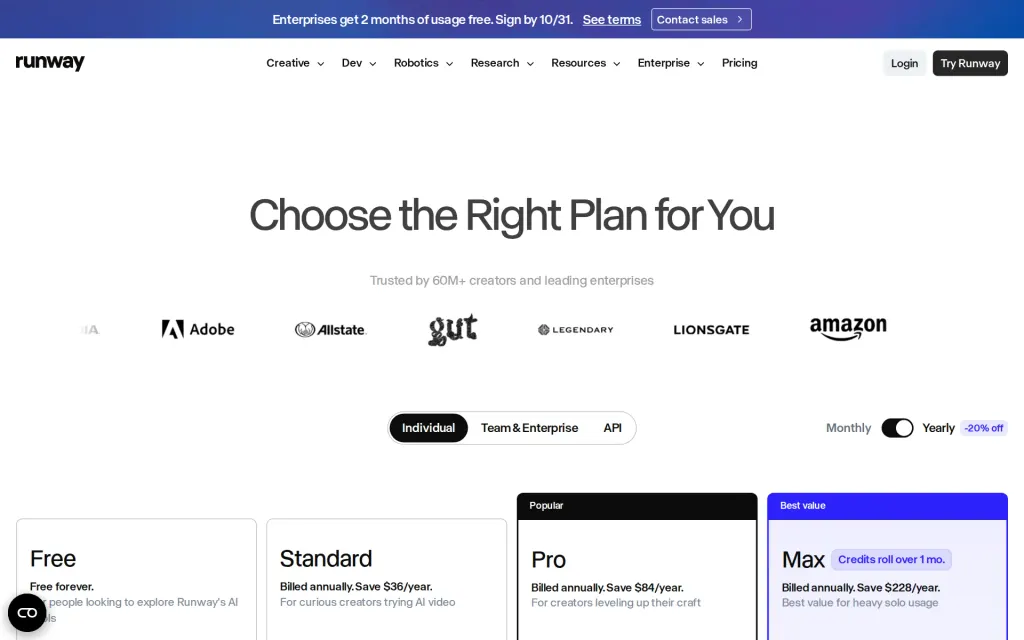
Pricing page, runwayml.com, captured 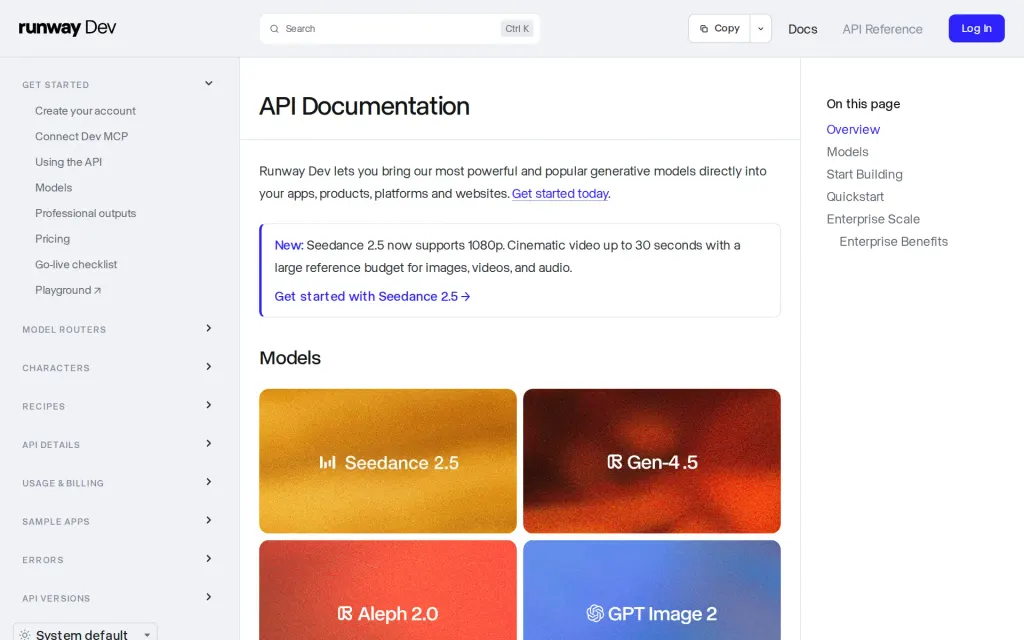
Docs, runwayml.com, captured
Filed under
Sources and updates
Last changed
Sources6
Updates1
- Free tier · Price · What it does
Is this yours? Claim it free and edit it in your dashboard, or feature it in Video & Audio AI.