
TameDuck
What is TameDuck?
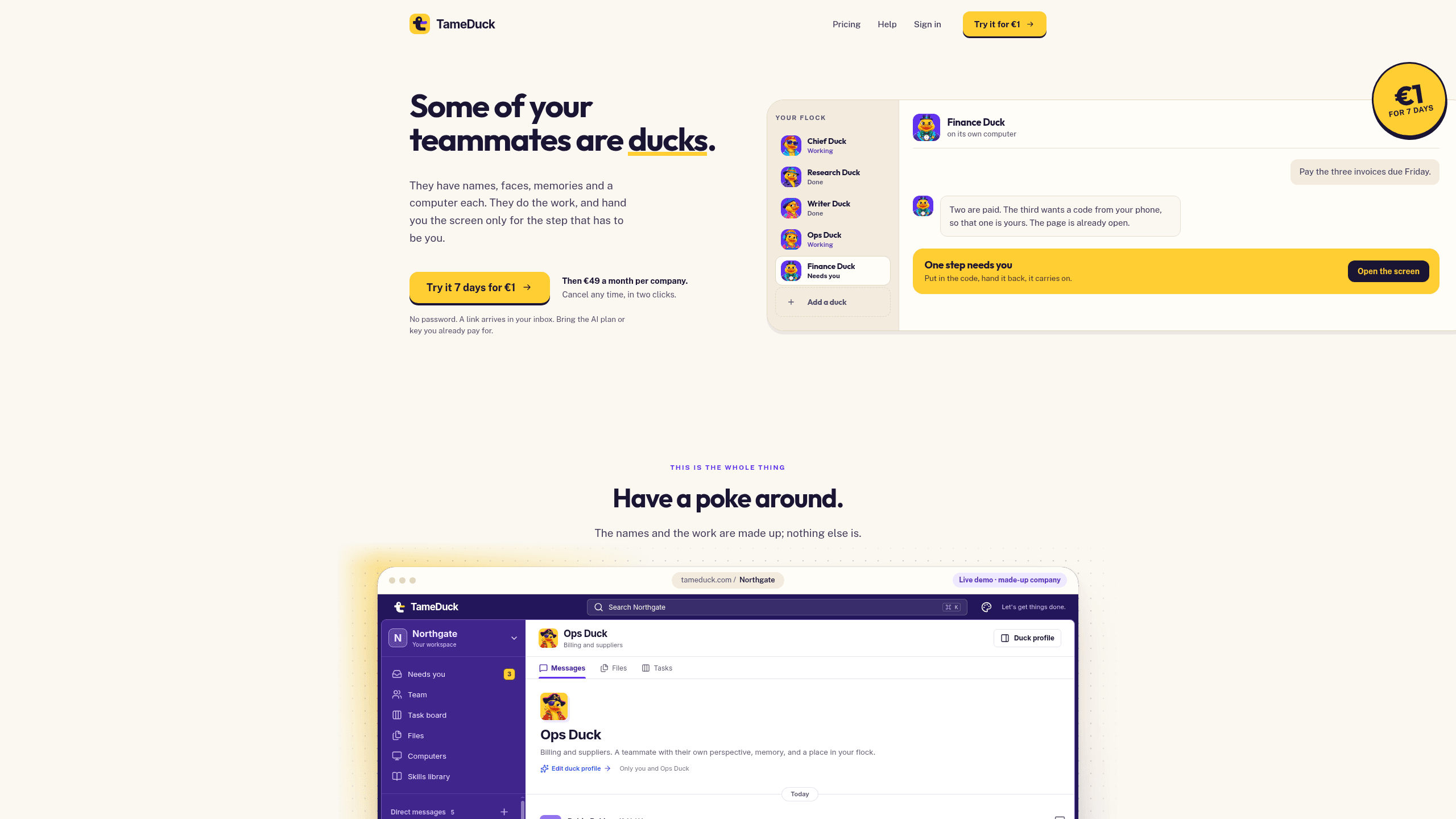
TameDuck is an open-source AI teammate platform for operations teams that lets each duck work in its own cloud Linux computer to browse, sign into tools, fill forms, and run code. It includes Your flock, Its own computer, The handover, The board, and a 1,000-skill library, and it connects to an OpenAI or ChatGPT account to run the ducks, with a per-duck webhook that lets Zapier or other apps start tasks (TameDuck has no listed app in Zapier's own directory). TameDuck's code is free and AGPL-3.0 licensed for self-hosting, where you cover your own server and AI costs. The hosted TameDuck Cloud plan runs a 7-day trial for €1 plus VAT that auto-renews to €49 a month plus VAT unless cancelled, with AI usage billed separately by your provider.
Last verifiedHow we evaluate
At a glance
- TameDuck is best for operations teams who want AI teammates that can work through browser tasks and pause for approvals.
- 7 days
What's genuinely good here
Each duck runs on its own small cloud Linux machine, not a shared browser session: a real desktop, terminal and full sudo, with files, tools and the browser's signed-in state kept between sessions. Commands stream into the chat as they run, so you're reading what happened rather than taking a summary on trust. The "handover" model is specific rather than vague — ducks are instructed to do the whole job themselves and stop only for a password, a code, a real human challenge or a payment, then hand the screen back once that one step is done. Every call to a connected tool needs an explicit approval (TameDuck says there is no always-allow and no expiry), and there's a per-company audit log plus a single switch to pause every duck at once. The self-host option is substantive, not a token gesture: the public repository ships a real, documented setup path (docs/self-hosting.md) under an AGPL-3.0-only licence, and you can read the whole application source before trusting it with a cloud computer that has sudo. Sources: tameduck.com/pricing, tameduck.com, github.com/internetco/tameduck.
The trial, the price, and what's actually free
Two different things are both called "free" on TameDuck's site, and they're not the same offer. The application code is free and AGPL-3.0 licensed — you can self-host it, but you pay your own server costs and your own AI usage, separately from TameDuck. The hosted service, TameDuck Cloud, is not free: it's a 7-day trial for €1 plus VAT, and TameDuck's own terms of service state it "auto-renews" — the Company plan starts by itself and its first month (€49/month plus VAT) is charged unless you cancel before day 7, in Settings → Billing. Pro is €99/month plus VAT for 100 ducks and 3× the computer use. There's a 14-day money-back window on the first month's paid charge (the €1 trial fee itself is not refunded), and the plan includes usage ceilings worth checking against your expected load: up to 50 ducks, up to 10 computers running at once, 200 computer starts a day and 40 days of running time a month company-wide. On both the hosted and self-hosted paths, your AI provider bills you separately for what the ducks actually use. Sources: tameduck.com/pricing, tameduck.com/terms (terms last updated 6 October 2026).
What "integrates with ChatGPT, OpenAI and Zapier" actually means
These are two different kinds of connection, worth separating. "ChatGPT" and "OpenAI" aren't third-party integrations in the usual sense — they're how you authenticate the AI model that powers the ducks: sign in with a ChatGPT Plus/Pro plan, or paste an OpenAI API key, per TameDuck's own setup guide (checked by TameDuck against its app on 5 October 2026). TameDuck's terms of service also name Anthropic and OpenRouter as supported AI providers, though the current connect-an-AI flow in the help docs only shows ChatGPT and OpenAI as options — worth confirming directly with TameDuck if you plan to run a non-OpenAI model. "Zapier" is different again: there's no TameDuck app in Zapier's own directory (zapier.com/apps/tameduck/integrations returns a 404, checked 10 October 2026). What exists is a private per-duck webhook URL, documented at tameduck.com/help/webhooks, that any HTTP-capable tool can POST a task to — Zapier's generic Webhooks action works, the same as a form or a script would.
How new the open-source release is
The public repository, internetco/tameduck, was created on 5 October 2026 — five days before this review — and carries zero stars, forks or watchers as of 10 October 2026. That's not a sign of trouble: the codebase itself is substantial (1,513 files, a real README, CONTRIBUTING.md, SECURITY.md and a working self-hosting guide), which reads as an existing product whose source was opened to the public recently rather than something built from scratch in days. But it does mean there's no history yet to judge: no release cadence, no issue-resolution pattern, no community fork activity. Anyone self-hosting today is an early adopter of the open-source release specifically, even if TameDuck Cloud itself predates it. Source: api.github.com/repos/internetco/tameduck, github.com/internetco/tameduck.
Who's behind it, and what you're agreeing to
TameDuck is run by Internet Company B.V., registered in the Netherlands (Chamber of Commerce number 61838659, Operetteweg 7, Almere), per its own terms of service and privacy policy. Those terms describe TameDuck plainly as "still young": the service is provided "as is" and "at your own risk," with total liability capped at the higher of €100 or what you paid in the prior 12 months. More materially for a tool that acts in real browser sessions: the terms state that everything a duck does — every form it submits, account it signs into, or payment it agrees to — is done on your instructions and you're responsible for it "as if you had done it yourself." That's a standard allocation for an agentic-automation product, but it's worth reading before connecting ducks to accounts that can spend money or commit to things, rather than discovering it later. Source: tameduck.com/terms, tameduck.com/privacy.
How much does TameDuck cost?
| Plan | Price | What's included |
|---|---|---|
| Trial | €1 |
|
| Standard | €49 a month |
|
Frequently asked questions
What is TameDuck?
TameDuck is an open-source AI teammate platform for operations teams that lets each duck work in its own cloud Linux computer to browse, sign into tools, fill forms, and run code. It includes Your flock, Its own computer, The handover, The board, and a 1,000-skill library, and it connects to an OpenAI or ChatGPT account to run the ducks, with a per-duck webhook that lets Zapier or other apps start tasks (TameDuck has no listed app in Zapier's own directory). TameDuck's code is free and AGPL-3.0 licensed for self-hosting, where you cover your own server and AI costs. The hosted TameDuck Cloud plan runs a 7-day trial for €1 plus VAT that auto-renews to €49 a month plus VAT unless cancelled, with AI usage billed separately by your provider.
How much does TameDuck cost? Is it free?
Self-hosting the open-source code is free, aside from your own server and AI costs. The hosted plan is a 7-day trial for €1 plus VAT, auto-renewing to €49 a month plus VAT (€99 plus VAT for Pro) unless you cancel first.
What is TameDuck used for? Who is it for?
TameDuck is used for Your flock, Its own computer, and The handover. It's built for Operations teams, Founders and small company admins, and Finance or billing teams.
Does TameDuck have an API and what does it integrate with?
It has no listed app in Zapier's directory (checked 10 October 2026). Any Duck can be given a private webhook link that Zapier's own Webhooks action, a form, or a script can POST a task to.
Is TameDuck open source or self-hostable?
Yes, TameDuck is open source and can be self-hosted on your own infrastructure.
Our take
Check the usage ceiling before rollout: Standard includes 200 starts a day and 40 days of running time a month for the whole company, with up to 10 computers running at once. If your workflows are bursty or long-running, verify those limits against your expected volume.

Explore other Browser Agents


