
NOS Workspace
What is NOS Workspace?
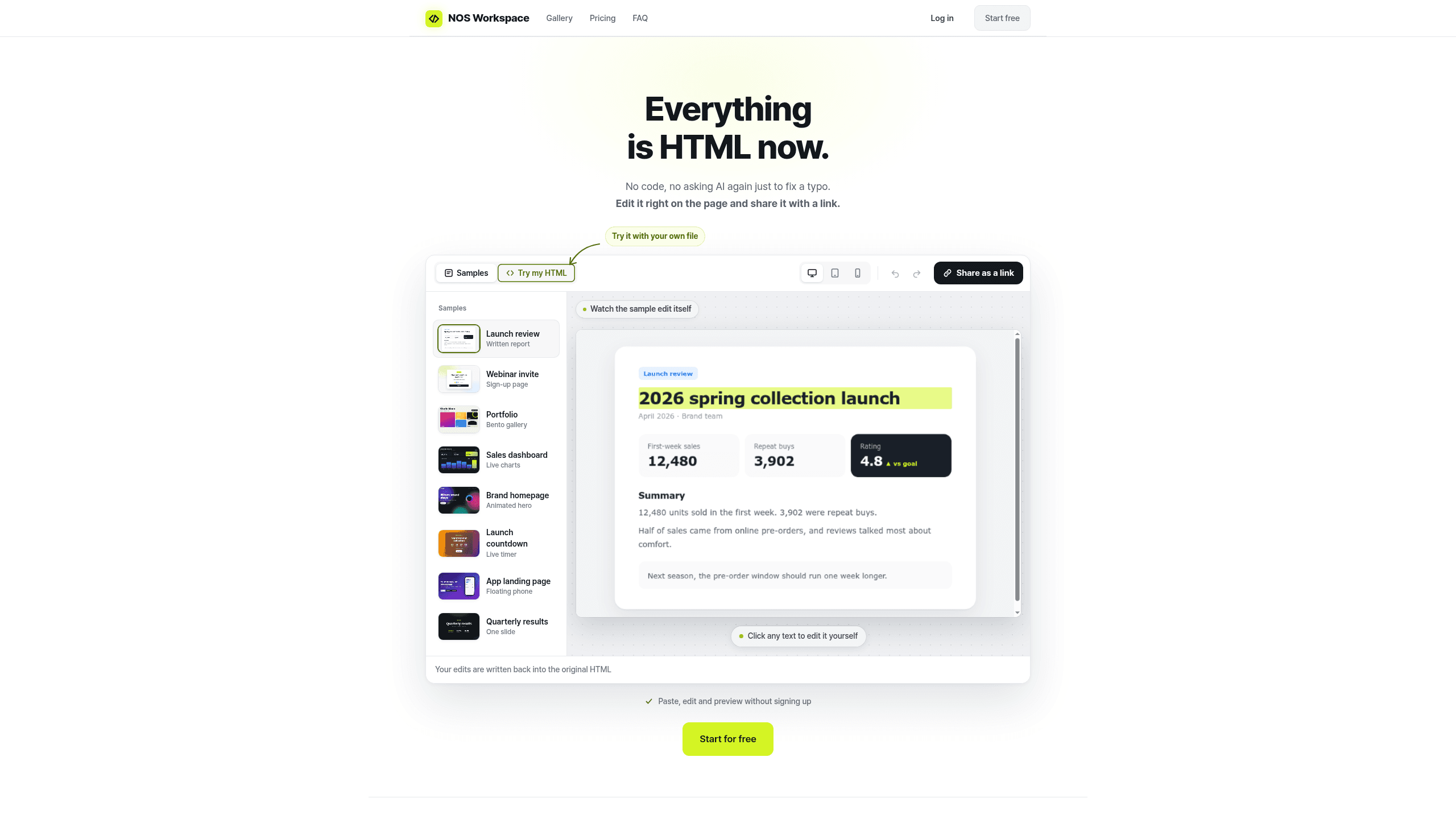
NOS Workspace is a workspace for teams that turns HTML files and docs into editable, shareable pages that stay live at the same URL. It includes inline editing, live edit, full-text search, version history, and roles for editor or read-only access. The workflow is built around sharing one link, and named users and tools include Claude, ChatGPT, and Cursor. Plans run Free $0, Personal $3.60 /mo, Team $7.60 /member/mo, and Enterprise contact.
Last verifiedHow we evaluate
At a glance
- NOS Workspace is best for teams who need editable HTML pages they can share as one stable link.
- Free $0; Personal $3.60 /mo; Team $7.60 /member/mo; Enterprise Contact
What it actually does
You give NOS an HTML file three ways: paste the code, drop the .html file, or (per the vendor, "in the works") connect an MCP-capable AI tool like Claude or ChatGPT directly. It renders the page live, and you can click any text on the rendered page to edit it in place — no code editing. The result gets a permanent URL (nos-workspace.com/d/...) that opens without the recipient signing in, and that URL never changes or gets reclaimed even after further edits, so a link already sent keeps working. Regular text documents and these HTML pages live side by side in one searchable team folder, with version history. This is confirmed on the product page and FAQ; https://nos-workspace.com/
Where it's genuinely useful
The problem it targets is specific and real: AI-generated HTML artifacts (Claude artifacts, ChatGPT canvases, etc.) commonly don't survive being emailed or Slacked — recipients get a raw .html attachment that downloads instead of opening, breaks on mobile, and can't be fixed except by going back to the AI and re-prompting, which can touch unintended sections. NOS's answer — paste once, edit by clicking, one stable link — is a clean, narrowly-scoped fix for that, not a general-purpose site builder or CMS. The vendor runs pasted/uploaded HTML on a separate, sandboxed domain under a Content Security Policy so that someone else's script can't reach your session when you open their link — a reasonable security design for a product whose whole premise is rendering strangers' HTML; https://nos-workspace.com/privacy, https://nos-workspace.com/terms
What it's not
It's a renderer and editor for already-generated static HTML, not a page builder, form backend, or data-connected app platform. NOS says scripts inside a pasted or uploaded file keep running (its examples are charts, animations and calculators) on a separate domain from your session, and that images inside the file keep working. It does not publish a list of what pasted HTML cannot do, such as form submissions, third-party embeds or live external data, so test your own page before relying on it. The vendor's own MCP connector — "save this to NOS" directly from Claude, ChatGPT or Cursor — is explicitly labelled "in the works" / "coming soon" on the site as of this review, not a shipped feature; https://nos-workspace.com/
Pricing and how the launch discount works
Pricing is public, in USD, on the pricing page. List prices are Personal $9/month and Team $19/month per seat; Enterprise is quote-only. The page currently applies a stated "half price at launch" promotion on top of a standard 20% discount for paying annually, with no end date given for the promo. Net effect at time of writing: Personal is $4.50/month billed monthly, or $3.60/month ($43.20/year) billed annually; Team is $9.50/month per seat billed monthly, or $7.60/month ($91.20/year) per seat billed annually. The Free plan is $0, unlimited documents, but caps you at 3 concurrent share links (turning one off frees a slot immediately) and stamps published pages with a NOS badge that paid plans remove. Team billing counts every workspace member regardless of role; sending a read-only link to someone outside the workspace is free and uncapped. Per-document size caps scale with plan: 2MB on Free, 8MB on Personal, 12MB on Team, custom on Enterprise. Because the launch discount has no stated expiry, a buyer should confirm the live price at checkout rather than assume these figures hold; https://nos-workspace.com/pricing
Who runs it, and what that means for continuity
NOS Workspace is operated by one named individual, Hoyeon Yeo, based in South Korea — stated plainly in the Terms, Privacy Policy and footer, not obscured. Paid orders are processed by Paddle.com Market Ltd as merchant of record, which handles billing, tax/VAT and is who appears on your card statement. There's a 14-day no-questions refund window on any charge, and cancelling or payment failure downgrades you to Free rather than deleting content — documents over the Free limit become read-only instead. There is no public status page, no public changelog, and no open-source repository for the product itself (the vendor's GitHub account holds only forked "awesome-list" repos, not product code). The company published a launch post on dev.to on 28 September 2026 and the earliest Wayback Machine snapshot of the domain is from 3 October 2026 — this is a very young, single-founder product with no independent press coverage or reviews found; https://nos-workspace.com/terms, https://nos-workspace.com/privacy, https://nos-workspace.com/refund, https://dev.to/nosworkspace/i-built-a-workspace-for-ai-generated-html-paste-it-fix-text-by-clicking-share-one-link-2n0a, https://github.com/nosworkspace
Privacy and data handling
The vendor states it does not use customer content to train AI models, does not sell personal data, and does not use advertising or cross-context tracking cookies. Infrastructure runs on Google Firebase (hosting, database, authentication); billing data goes to Paddle. View logs on published documents (document ID, timestamp, visitor ID, referrer) are kept up to 24 months; account data is deleted from live systems promptly on account deletion and purged from backups within 30 days. These are the vendor's own stated policies, not independently audited; https://nos-workspace.com/privacy
How much does NOS Workspace cost?
| Plan | Price | What's included |
|---|---|---|
| Free | $0 |
|
| Personal | $3.60 /mo |
|
| Team | $7.60 /member/mo |
|
| Enterprise | Contact |
|
Frequently asked questions
What is NOS Workspace?
NOS Workspace is a workspace for teams that turns HTML files and docs into editable, shareable pages that stay live at the same URL. It includes inline editing, live edit, full-text search, version history, and roles for editor or read-only access. The workflow is built around sharing one link, and named users and tools include Claude, ChatGPT, and Cursor. Plans run Free $0, Personal $3.60 /mo, Team $7.60 /member/mo, and Enterprise contact.
How much does NOS Workspace cost? Is it free?
NOS Workspace has a free plan, with paid tiers including Personal at $3.60 /mo, Team at $7.60 /member/mo, Enterprise at Contact.
What is NOS Workspace used for? Who is it for?
NOS Workspace is used for Edit it right on the page, Share it with a link, and Click any text to edit. It's built for Product teams, Designers, and Operations teams.
Our take
Check the Free plan's 3-share-link limit before rolling it out to a team. If you need more than that, Personal removes the cap, while Team adds live collaboration, roles, and dedicated support.

Explore other Workflow Automation


